
When the power goes out: checking with your building in the 100 m room
Is it just your flat or the whole building? How to use the 100 m room during a power cut or water outage, read the replies, save your battery and look out for neighbours.
The lights go out, the fridge goes quiet, and the first question is always the same: is it just my flat, or the whole building? When the power goes out, CicadaChat's 100 m room is the quickest way to check with your building and the neighbours across the street. The people who can answer are exactly the ones within 100 m, and they're asking the same thing. This article shows how to use the 100 m room during a power cut, a water outage or a broken lift, what it can and can't do, and how to save your battery while you wait.
CicadaChat is not an emergency service. If there's a fire, smoke, a gas smell, sparking wires, someone trapped in a lift or anyone hurt, call your local emergency number first. Chat with your neighbours afterwards.
Checking with your building in the 100 m room
The 100 m room is a circle with a 100 m radius around wherever you are. From home, that usually means your building, the buildings on either side and the ones across the road. It's the ideal size for an outage question. A citywide group would bury your message among people who have power, and your immediate neighbours are the only ones who can tell you whether the problem is in your flat, your building or the whole street.
- Open cicadachat.com on your phone.
- Pick Within 100 m, or the 100 m tab on a phone.
- Ask a short question: "Is the power out for everyone or just me?"
- Watch for replies, and look at the distance next to each one.
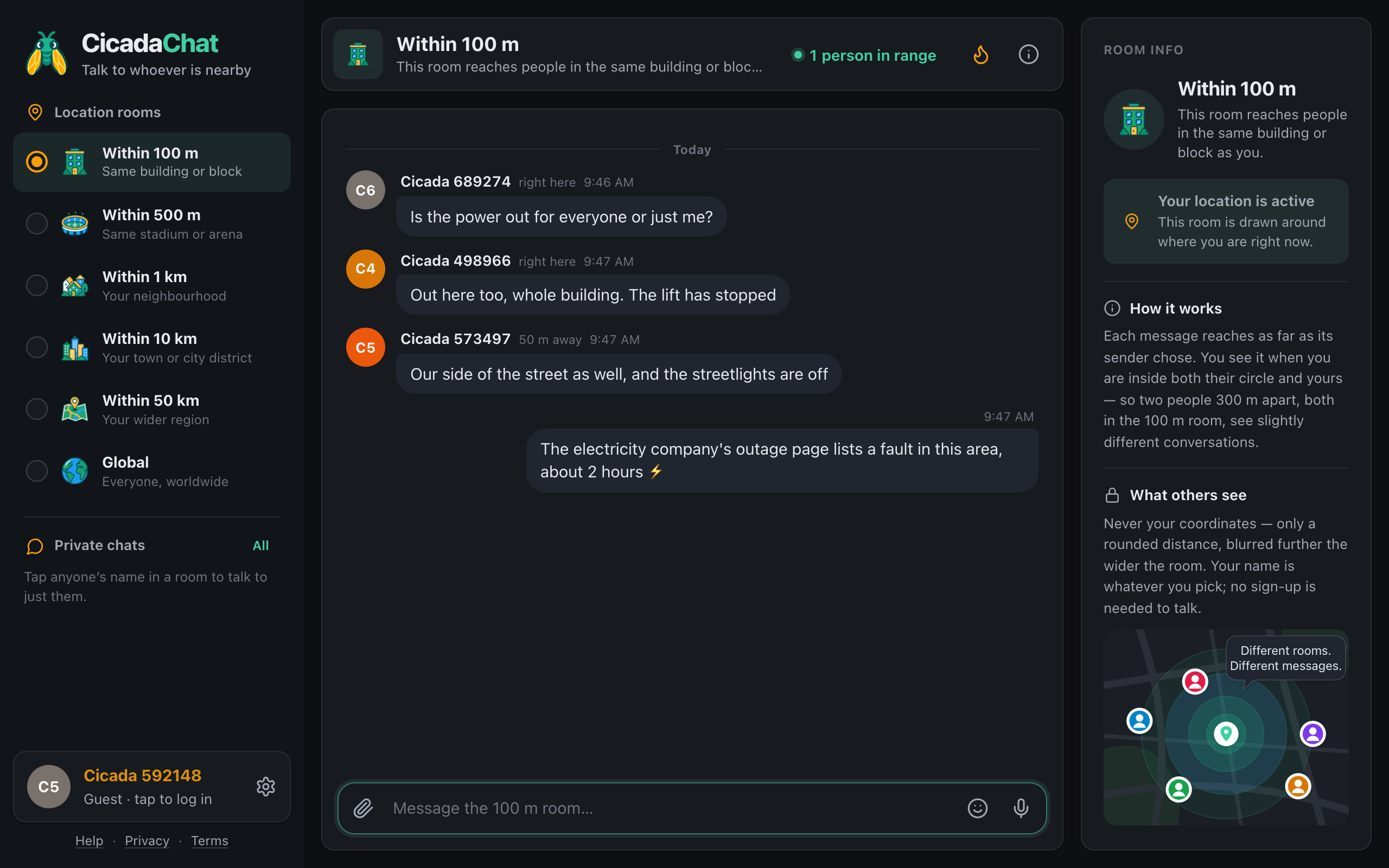
A screenshot of the 100 m room in dark mode during a power cut. The distances show it is not just one flat: replies come from right here and 50 m away.
Reading the replies
The distance next to each name tells you more than it seems. In the 100 m room you'll see right here for anyone under 50 m away, and 50 m away or 100 m away beyond that.
- Only "right here" replies saying their power is out: probably your building. Check the building's main switch or tell the building manager.
- "50 m away" and "100 m away" replies too: it's the street or the area. The electricity company is the one to check.
- Neighbours "right here" with power: the problem may be in your own flat. Check your fuse box or breakers before anything else.
The distances are rounded on purpose, so nobody can work out anyone's exact flat. They're still enough to tell "my building" from "the whole block".
Does CicadaChat work without power?
Your phone does, for a while, and CicadaChat needs only a browser and an internet connection. Two things to know:
- Your home Wi-Fi router is probably off. When the power goes, switch to mobile data. Mobile networks usually keep running during local outages.
- Location still works. Your phone's GPS doesn't depend on Wi-Fi. Indoors, the fix can be less accurate than usual. If the room looks odd, step to a window.
If you often use CicadaChat on your phone, add it to your home screen so it opens with one tap, like an app. The help article using CicadaChat on your phone: add it to your home screen shows how on iPhone and Android.
If you're not at home
If you hear about an outage while you're at work or away, the 100 m room can't show you what's happening at home. Rooms are always drawn around where you are right now, not around an address you choose, so you'll be looking at the people around you instead. To check on home, message a neighbour you're friends with in a private chat. Private chats don't depend on distance.
Saving your battery while you wait
An outage can last minutes or hours. A few habits help your phone last:
- Post, then close. Your message stays in the room, and so do the replies. You don't need to keep the app open to catch them. Check back every so often.
- Use dark mode. On most phone screens, a dark theme uses less power. CicadaChat follows your phone's setting, or you can choose Dark in Settings.
- Turn the screen brightness down, and close apps you don't need.
- Keep messages short. One clear question and one clear update beats a long back and forth.
A power cut, message by message
Here's how a typical outage plays out in the 100 m room, and what each message tells you.
8:12 pm. The lights go out. You switch your phone to mobile data, open CicadaChat, tap 100 m and ask: "Is the power out for everyone or just me?" The header says 1 person in range, so for the moment you're the only one looking.
8:14 pm. A reply appears from someone right here: "Out here too, whole building. The lift has stopped." Now you know it isn't your fuse box, so there's no point checking your breakers.
8:15 pm. Another reply, from someone 50 m away: "Our side of the street as well, and the streetlights are off." That's beyond your building, so it isn't the building's main switch either. The electricity company is the one to check.
8:20 pm. Someone has looked at the electricity company's outage page and shares what it says: a fault in the area, about two hours. Several people react with 👍, which tells everyone the update has been seen, without a flood of "thanks" messages.
8:25 pm. A neighbour asks whether anyone on the top floor needs help with the stairs. The conversation moves to a private chat to sort out the details.
10:05 pm. "Power's back on our side." A few more reactions, and the room goes quiet again.
Four messages and a few reactions answered the question everyone in the building had, without anyone phoning the building manager or knocking on doors.
What to share, and what to keep to yourself
The people reading the 100 m room are your neighbours, but also anyone passing within 100 m. In an outage, useful messages are about the building and the street:
- "Out here too, whole building. The lift has stopped."
- "Our side of the street as well, and the streetlights are off."
- "The electricity company's outage page lists a fault in this area, about 2 hours."
- "The building manager says the generator will run the lift and stair lights."
Things that are better kept out of a public room: that your flat is empty because you're away, that your door or gate won't lock without power, or that you're alone and without light. If you need help from one neighbour, tap their name and ask in a private chat.
Looking out for each other
Outages are hardest on the people who can't easily manage alone: older neighbours on high floors when the lift stops, families with babies, anyone who relies on powered medical equipment. The 100 m room is a good place to offer help:
- "I have a spare torch and candles, message me if you need one."
- "Going to the shop on the corner, can pick up water for anyone who can't do the stairs."
- "I have a power bank that's fully charged, happy to lend it."
Offer in the room, then arrange the details privately. And if you know someone in your building who depends on medical equipment and doesn't use CicadaChat, knock on their door. No chat replaces that.
Water, lifts, heating and the internet
Everything above works just as well for other outages:
- Water off: "Is anyone else's water off?" often turns up someone who read the maintenance notice you missed.
- Lift out of order: tell the building, and ask whether anyone has already called the company.
- Heating or hot water: as with power, the distances tell you whether it's your flat or the building.
- Internet down: ask from mobile data. If neighbours on the same provider are down too, it's not your router.
For outages that reach further than your block, move up a rung. If replies say "the whole street is dark", the 500 m or 1 km room will tell you how far it goes. The help article choosing a room: 100 m, 500 m, 1 km, 10 km, 50 km or Global explains what each rung reaches.
When the power comes back
Close the loop. "Power's back on our side" takes a second and saves your neighbours from wondering whether it's just them again. If the building manager or the electricity company explained the cause, share that too. A quick 👍 on someone else's "it's back" message also works: it tells them their update reached people.
After a long outage, the room may have gathered useful notices, such as how to reset the building's gate or which fridge items to throw away. The Hot view, behind the flame button in the header, shows the room's most-reacted messages from the past week, which is a quick way to find the updates your neighbours found most useful.
Before the next outage
The best time to set up a building's outage channel is when the lights are on. Mention the 100 m room to your neighbours, or leave a note in the lobby: "When something stops working, ask in the 100 m room on CicadaChat: cicadachat.com." The more people know it's there, the faster the answers come next time. For how to get neighbours using the room day to day, see talking to your neighbours: an apartment building chat without a group to join.
No comments yet. Start the conversation.