
Talking to your neighbours: an apartment building chat without a group to join
The 100 m room works as an apartment building chat with no admin, no invitations and no phone numbers. What neighbours use it for, and how to keep it friendly.
Most apartment buildings have a group chat, or wish they did. Someone has to set it up, collect phone numbers, add the new family on the fourth floor and remove the tenant who left last spring. CicadaChat's 100 m room gives you an apartment building chat without any of that: open the app in your building, tap Within 100 m, and you're talking to your neighbours. There's no group to join, no admin, and no list of phone numbers. This article shows how talking to your neighbours works in the 100 m room, what it's good at, and how to keep it friendly.
An apartment building chat without a group to join
A CicadaChat room isn't a container that people are added to. It's a circle drawn around you. In the 100 m room, that circle has a 100 m radius, which in most cities covers your building, the ones either side and the ones across the street. Whoever is inside it and has CicadaChat open is part of the conversation.
That has a few pleasant consequences for a building:
- Nobody has to be invited. The new neighbour is in the room the day they move in, as soon as they open the app.
- Nobody has to be removed. When someone moves away, they're simply no longer within 100 m. Their old messages stay where they were written, but new ones from your building no longer reach them.
- No phone numbers are shared. People see a name, a picture if they set one, and a blunt distance such as right here or 50 m away. Nobody sees your number, your email or your coordinates.
- No sign-up is needed. A neighbour can open cicadachat.com in a browser and chat as a guest straight away.
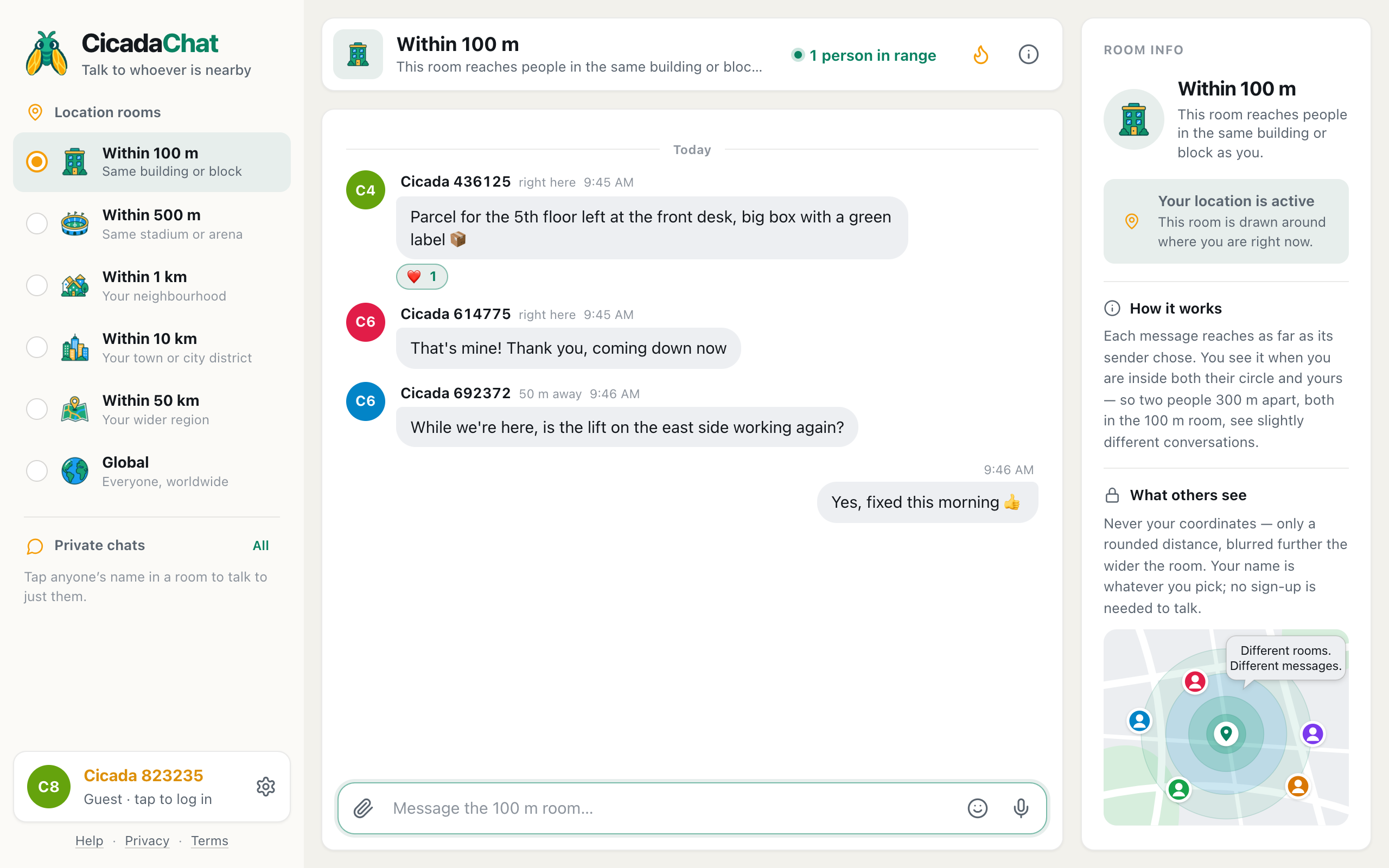
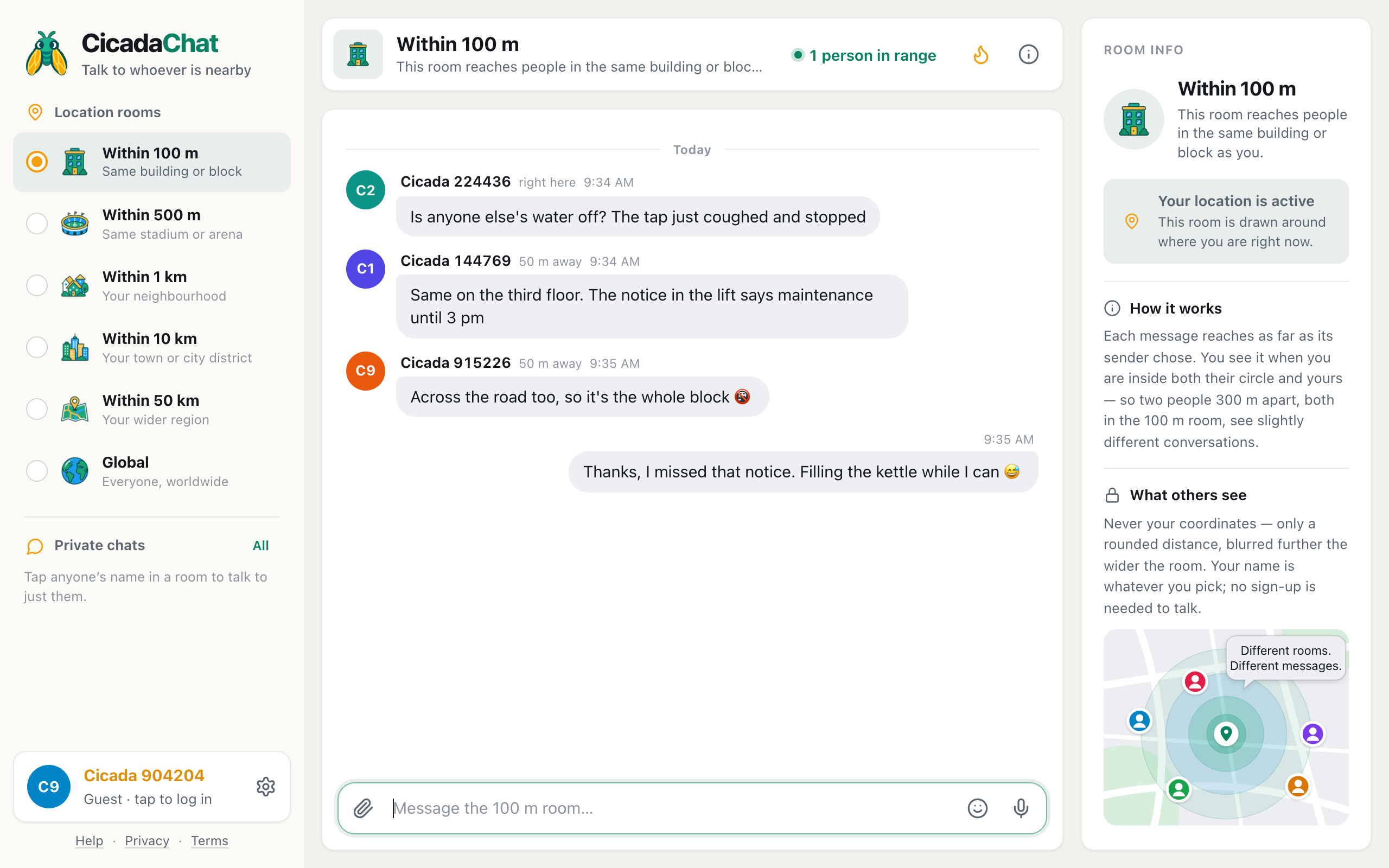
A screenshot of neighbours using the 100 m room as their building chat. The heart under the first message is a thank-you from a neighbour.
What neighbours use it for
The conversations that work best in the 100 m room are the ones that matter only to people close by. A few that come up in every building:
Parcels and deliveries
"Parcel for the fifth floor left at the front desk" saves a trip for someone and a lost parcel for someone else. So does "the courier is in the lobby asking for flat 3B's neighbour". The person it's for may not be online right now, but the message stays, and they'll see it when they open the room.
The lift, the water, the heating
When something stops working, the first question is always "is it just me?". In the 100 m room, the people who can answer are exactly the ones in the room. One message saves a dozen neighbours from each calling the building manager to report the same thing.
Noise, kindly
"Whoever is practising piano in the evenings, you're getting really good" and "we're having a few friends over on Saturday, sorry in advance if it gets loud" are the kind of messages that make a building friendlier. They're far easier to write in a chat than on a note taped to a door.
Borrowing, lending and giving away
A ladder for an afternoon, a cot for visiting grandchildren, a sofa that won't fit in the new flat. The 100 m room is the right audience: close enough that nobody needs a car.
Newcomers
"Just moved in on the second floor, where do the recycling bins go?" is a great first message. Answer it, and the building has one more person who knows the room exists.
How the conversation reaches everyone
Two rules decide who sees what, and both are worth knowing if you're using the room as your building's chat.
- Your message reaches people within 100 m of you, whichever local room they're reading. A neighbour who usually keeps CicadaChat on the 1 km room still sees your 100 m message, because they're inside your circle and you're inside theirs.
- You see everything said within 100 m of you, in any local room. If a neighbour writes in the 1 km room from their flat, you'll see it in the 100 m room too.
So the whole building doesn't have to agree to sit in the same room. As long as people are within 100 m of each other, the building's messages reach them. The Global room is the one exception: it's separate from all the local rooms.
Because each circle is drawn around its reader, a large building can look slightly different from one end to the other. Someone at the far corner may see a message from across the street that you don't, and the other way round. For a typical building that difference is small.
Replies, reactions and the typing line
There's no threading in a CicadaChat room. Everything is one conversation in time order, so it helps to make replies stand on their own: "Yes, the east lift was fixed this morning" is clearer than "yes".
For a quick acknowledgement, react instead of replying. The row of quick reactions offers 👍, ❤️, 😂, 😮, 😢, 🔥, 🎉 and 👀. A ❤️ on "parcel at the front desk" says thank you without another message. Reactions also feed the room's Hot view, so the notices people found most useful this week stay easy to find.
When someone is writing, a line above the message box says so, such as Cicada 614775 is typing…, so you know an answer is on its way.
Taking a conversation somewhere private
Some things shouldn't be discussed in front of the whole block: arranging to hand over a spare key, a problem with a specific neighbour, anything with a flat number in it. Tap the person's name on any of their messages and start a private chat. Private chats are just the two of you, and they keep working when either of you leaves the building, because they don't depend on distance. The help article private chats: how to message someone one to one covers how to start one and find it again.
Keeping the building chat friendly
A 100 m room is a small, local place. The people reading it are the people you pass on the stairs. A few habits keep it pleasant:
- Write as you'd speak in the lift. The tone that works face to face works here.
- Stay on topic for the building. Chatter about the football is fine, but if it drowns out "the water's off tomorrow", move it up to the 1 km room.
- Don't name and shame. "Could whoever parks in front of the bins move their car?" gets results. Naming a flat starts an argument.
- Close the loop. If you asked about the lift and it's fixed, say so. It saves the next person from asking.
- Remember messages stay. There's no way to edit or delete a message after sending, so read it once before you press Enter.
When your building is bigger, or smaller, than 100 m
A 100 m radius is a good fit for most apartment buildings, but not all of them.
In a large complex, with several towers around a courtyard, two neighbours at opposite corners may be more than 100 m apart. Each of them sees what's within 100 m of them, so the complex gets overlapping conversations rather than one. For notices that concern the whole complex, such as the water being shut off or the courtyard being closed, post in the 500 m room. Your message still reaches everyone within 100 m of you, because the 100 m room shows everything said nearby, and it also reaches the far towers.
In a small building on a busy street, the opposite happens. The 100 m circle covers your building and a good part of the street: shops, a café, the building opposite. That's often a bonus, since the shopkeeper downstairs is a neighbour too. But it's worth remembering that "the building chat" is heard by more than the residents.
In houses, 100 m covers a handful of neighbours on either side and across the road. For a street or a small estate, the 100 m room works the same way it does in a building. For a whole neighbourhood, the 1 km room is the one to use.
Guests and accounts in a building chat
Anyone can join the building chat as a guest, under an automatic name like Cicada 823235. That's perfect for a quick question, and it's anonymous by default.
If you'd like your neighbours to recognise you, create a free account and pick a name. Many people use just a first name, which is friendly without giving away which door is theirs. An account also lets you add neighbours as friends and create a private room for your building's residents, which is handy for things you'd rather not say to everyone within 100 m, such as organising a residents' meeting. Creating an account keeps your guest messages and private chats.
A good way to use both: keep the 100 m room for anything that anyone on the block might need to know, and a private room for the residents who want to organise things together. See planning a building get-together from the 100 m room for how that can work in practice.
Getting your building started
A 100 m room becomes a building chat when people know it's there. The easiest way to start:
- Open cicadachat.com at home, allow your location, and pick Within 100 m.
- Post something useful: a question, a notice, a welcome.
- Put a short note in the lobby or the lift: "Our building chats in the 100 m room on CicadaChat: cicadachat.com. No sign-up needed."
- Answer the first people who show up.
If the room is quiet at first, that's normal. The 100 m room: chatting with the people in your building or on your block explains how the room works from the start, and it's worth sharing with the neighbours who ask what it is.
No comments yet. Start the conversation.