
"I'm by the blue door": sharing your location to meet up within 100 m
A pin and a caption settle where to meet in one message. How sharing your location works in CicadaChat, who sees it, and when words are the better choice.
"I'm outside." "Which entrance?" "The one with the tree." "There are three trees." Meeting someone you've only chatted with is surprisingly hard, even when you're less than 100 m apart. CicadaChat lets you settle it in one message: share your location, add a caption like "I'm by the blue door", and the other person sees an exact pin on a map. It's also the one time CicadaChat shows anyone exactly where you are, so it's worth knowing how it works before you use it. This article covers sharing your location to meet up within 100 m: how to do it, who sees it, and when words are the better choice.
How sharing your location works
Normally, CicadaChat never sends your position to anyone. Other people see only a rounded distance next to your name: right here, 50 m away or 100 m away in the 100 m room. Your coordinates stay on the server, where they're used to decide who sees what.
Sharing a location is the deliberate exception. When you attach one, your phone takes a fresh reading of where you are, and that exact spot is sent with your message as a pin. Everyone who can read the message can see it, open it in a map, and walk to it. It's stored separately from the position CicadaChat uses for rooms, and only in the message you chose to attach it to.
How to share your location in the 100 m room
- Walk to the place where you want to meet, such as the entrance, the bench or the corner.
- Tap the paperclip next to the message box.
- Choose Location. CicadaChat asks your phone for your current position.
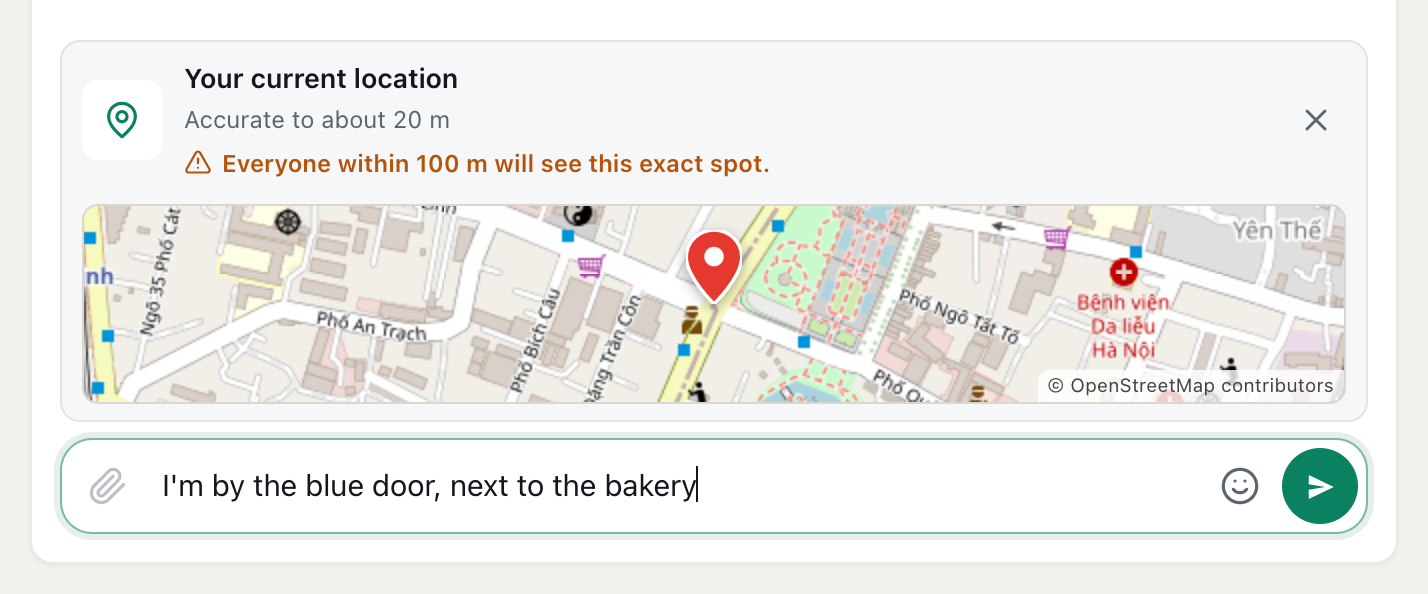
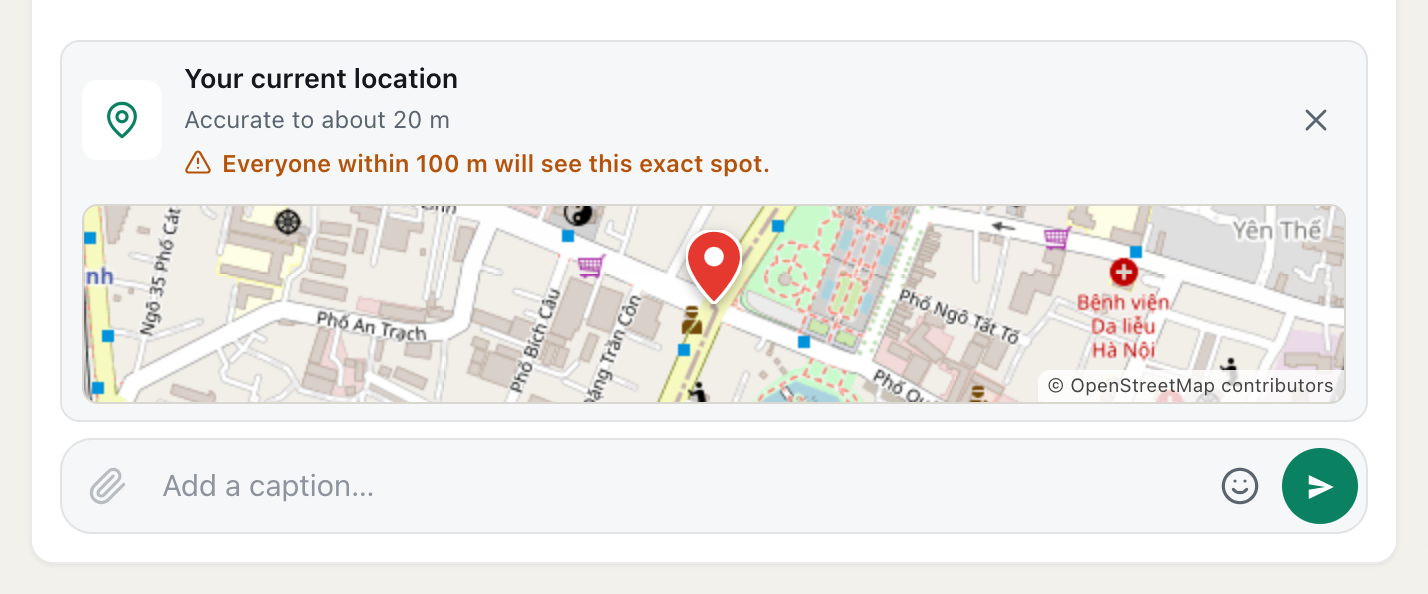
- Check the preview. It's labelled Your current location, shows how accurate it is, such as Accurate to about 20 m, and has a small map with a red pin.
- Read the warning in orange: Everyone within 100 m will see this exact spot.
- Type a caption in the box, which now says Add a caption…, and press send.
A screenshot of a location ready to send, with a caption. The orange warning says who will see the pin, and the X removes it.
Changed your mind? Tap the X in the corner of the preview to remove the location before sending. Nothing leaves your phone until you press send.
What the other person sees
The message arrives as a card titled Shared location, with the coordinates, links to open the spot in Google Maps or OpenStreetMap, and a small map with the pin. Your caption appears underneath. Tapping the map opens it in Google Maps, where walking directions are one more tap away.
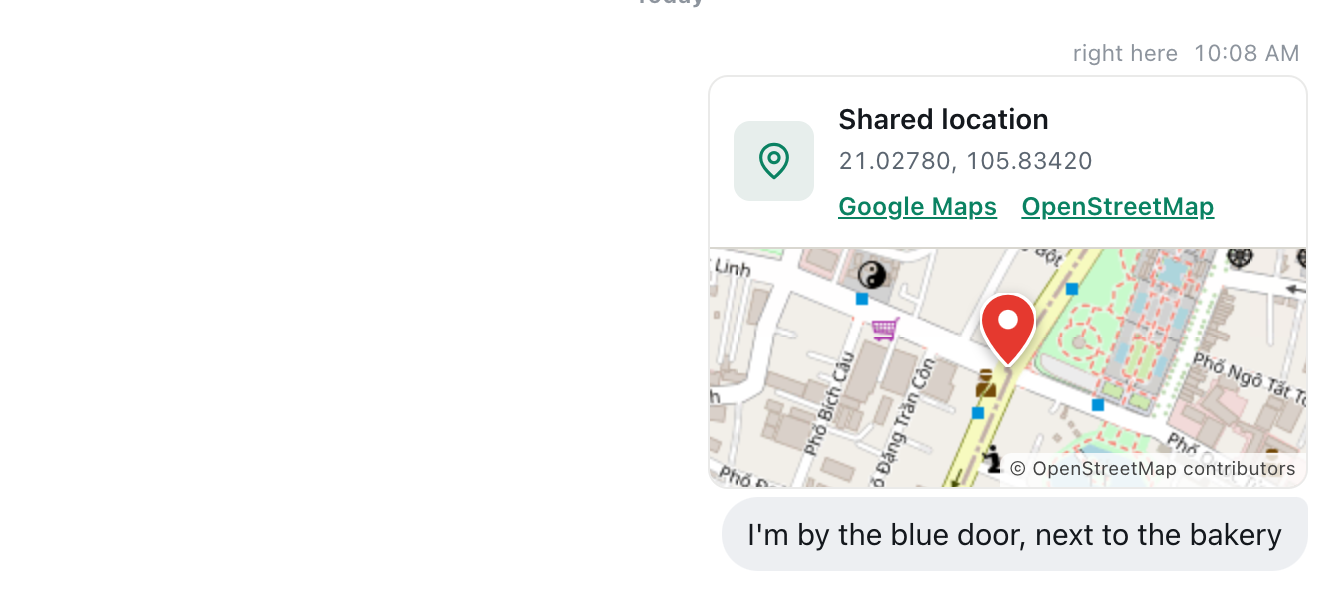
A screenshot of the location as others see it. Tapping the map opens it in Google Maps for walking directions.
The caption does half the work
A pin is precise, but a pin alone can still leave someone circling a building. Phone location can be off by tens of metres, especially between tall buildings, and a pin can't say which side of a door you're on. A good caption fills the gap:
- "I'm by the blue door, next to the bakery."
- "Under the big tree, wearing a yellow raincoat."
- "At the bike racks by the side entrance, not the main one."
Look at the accuracy line in the preview before you send. If it says something large, such as Accurate to about 60 m, the pin is a rough guide, and your caption matters more. Stepping out from under a roof or away from tall walls usually improves it. If you wait for a better fix, remove the location and attach it again, because each attachment takes a fresh reading.
Who sees your location
This is the important part. A shared location goes to everyone who can read the message:
- In the 100 m room: everyone within 100 m of the spot you sent it from who opens a local room, now or later. That's why the warning appears. Messages stay, so the pin stays too.
- In a private chat: only the other person. There's no warning in a private chat, because nobody else can see it.
- In a private room: every member of that room.
So for meeting one person, a private chat is almost always the better place for the pin. Tap their name on any of their messages to open one. Use the 100 m room for a pin that's meant for a group: "The picnic is here, come and join us."
When to use a pin, and when to use words
Good times to share
- Meeting a group in a public place: a park, a square, the entrance of a market.
- Showing where something is: the lost cat under the car, the free sofa on the pavement.
- Places that are hard to describe: a side door, a spot in a big car park.
Times to use words instead
- From home. Never share a pin from inside your flat in the 100 m room. It turns "someone in this building" into "this exact spot". Walk to the lobby or the gate first, or describe the place in words.
- When it's obvious. "At the café on the corner" needs no map.
- When you're alone and it's late. Share with the one person you're meeting, in a private chat, not with the whole block.
The deeper guide, how to share your location in a message, and who will see it, covers every kind of chat.
A meet-up, step by step
Here's how a typical meet-up goes, from the 100 m room to the handshake:
- In the 100 m room at a hostel, someone suggests the night market. A few people are in.
- You agree a time in the room: "Meet at 7, outside the main entrance."
- At 7, the entrance turns out to have two doors and a crowd. You walk to the blue one, attach your location and write "I'm by the blue door, next to the bakery."
- The others see the pin and the caption, tap the map, and walk over.
- Once everyone's there, nobody needs the pin any more. It stays in the room, but it points at a public doorway, which tells nobody anything about where you live.
That last point is the rule of thumb: share pins of public places, and let them stay public.
Accuracy and battery
- Outdoors, a phone's location is usually accurate to within a few metres.
- Indoors and between tall buildings, it can be off by tens of metres. The accuracy line in the preview tells you how far to trust it.
- Location must be allowed for CicadaChat in your browser. If attaching a location fails, check your browser's site settings.
- Battery: attaching a location takes a single reading, not continuous tracking. Your position isn't shared again unless you attach it again.
What a shared location is not
It's worth being clear about what CicadaChat doesn't do, so you're never surprised:
- It isn't live. The pin shows where you were when you attached it. If you walk away, it doesn't follow you.
- It can't be taken back. There's no way to edit or delete a message after sending, and that includes a pin.
- It doesn't change your rooms. Sharing a pin doesn't change the rounded distance shown next to your name on other messages.
Common questions
Can I drop a pin somewhere else, not where I am?
No. Location always attaches your phone's current position. You can't pick a spot on a map or share someone else's position. To show a place you're not at, walk there first, or describe it in words.
Does the pin show my name?
It's part of your message, so it appears under your name, like anything else you send. In the 100 m room, that means people can connect the pin with you. Another reason to pin public places only.
Can I share my location as a guest?
Yes. Sharing a location works the same for guests and registered accounts, in rooms and in private chats.
What if my browser says location is blocked?
Attaching a location needs the same permission the local rooms use. If CicadaChat can't get your position, it says so above the message box. Allow location for CicadaChat in your browser's site settings, and try again.
Does sharing a location tell people where I live?
Only if you share it from home. The rooms themselves never reveal your coordinates: people see a rounded distance next to your name. A pin is different, because it's the exact spot you were at when you attached it.
Can I share a location in the Global room?
Yes, but think twice. In Global, the warning reads Everyone in the global room will see this exact spot. That's everyone on CicadaChat, anywhere in the world.
Privacy in short
CicadaChat keeps your coordinates to itself, unless you choose to share them. When you do, the app tells you exactly who will see them before anything is sent. In the 100 m room, share pins of public places, keep your home out of it, and send pins for one person in a private chat. For the rest of what your neighbours can and can't see, read privacy in the smallest room: what the people within 100 m can and can't see. And if you're using pins to meet fellow travellers, meeting fellow travellers in your hotel or hostel with the 100 m room has more ideas.
No comments yet. Start the conversation.