
New in the neighbourhood: getting to know the area with the 1 km room
Just moved in? How to use CicadaChat's 1 km room to learn where to shop, when the bins go out and where to meet people, and how to turn helpful strangers into neighbours.
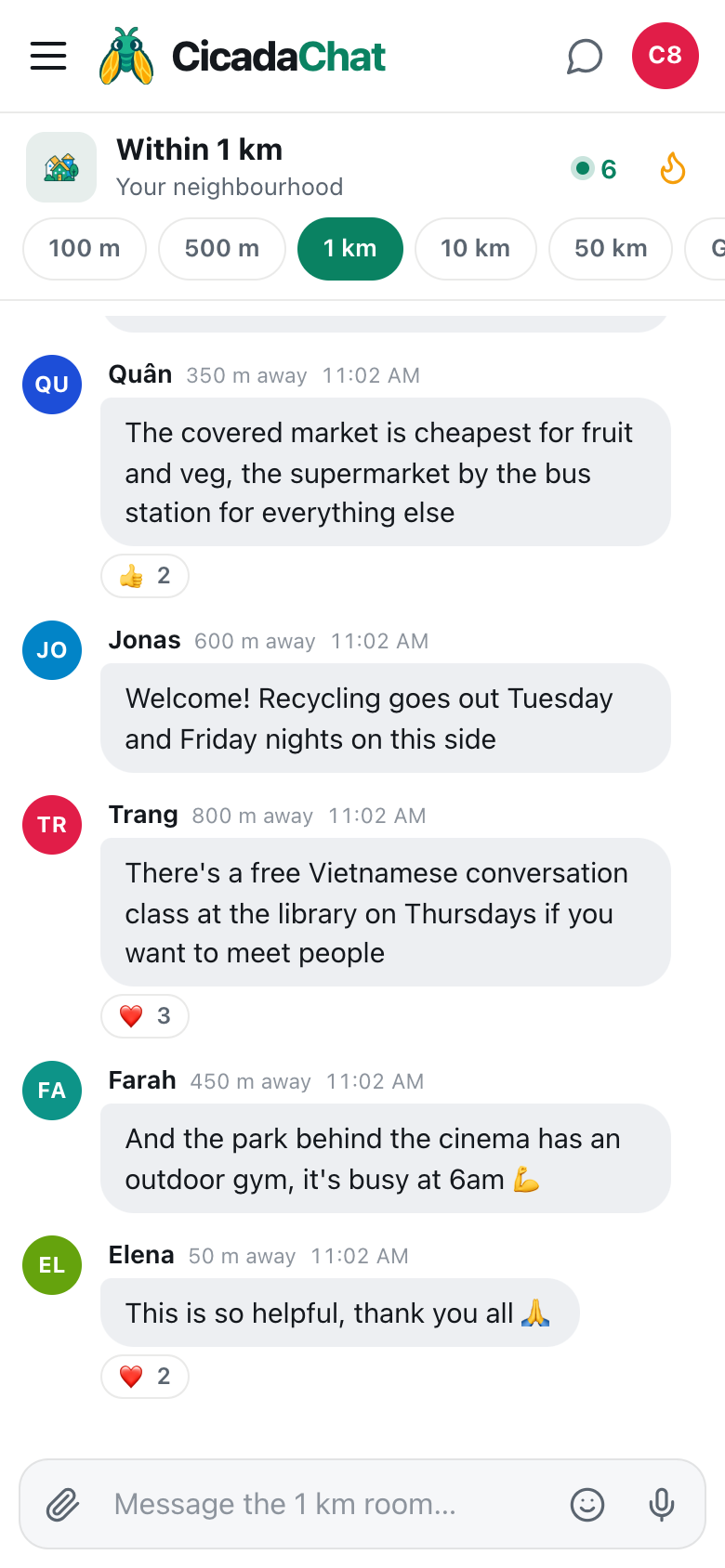
The boxes are in, the bed is up, and you have no idea where anyone buys vegetables. Moving to a new neighbourhood means relearning all the small things you used to know without thinking: which market is cheapest, when the rubbish goes out, where the nearest pharmacy is, which café is quiet enough to sit in. Everyone within a kilometre of your new front door already knows. CicadaChat's 1 km room puts you in one conversation with them from the first day, without having to find a group, be invited or introduce yourself at a residents' meeting. This article is about getting to know the area with the 1 km room when you're new in the neighbourhood: what to ask, how to ask it, what to share and how to turn a helpful stranger into a neighbour you know.
Why the 1 km room suits someone new
When you're new, you don't yet know which building, which street association or which parents' group you belong to. You don't know anyone to ask to add you to anything. CicadaChat doesn't need any of that. The 1 km room is a circle drawn around you, and everyone inside it is already in your room, whether they moved in last week or forty years ago.
A kilometre in every direction is roughly the part of town you'll get to know on foot: the shops you'll walk to, the bus stop you'll use, the park you'll run in. That makes it the right size for a newcomer's questions. The 100 m room is often too small to have an answer, and the 10 km room is so wide that "the market" could mean a dozen places.
And because the room is the default, you don't have to do anything to find it. Open CicadaChat, allow your location, and you're in.
Your first message
A good first message says you're new and asks one thing that's easy to answer. For example:
Just moved in near the old cinema! Where do people do their weekly shop around here?
That works because it gives a landmark rather than an address, so neighbours know which side of the neighbourhood you mean, and it asks a question that anyone who lives there can answer in one line. It also tells people you're new, which tends to bring out the kindest side of a room.
A screenshot of the 1 km room answering a newcomer. Neighbours between 350 m and 800 m away reply with shopping, recycling and meet-up tips.
In the example above, the answers came from 350 m, 600 m, 800 m and 450 m away: the covered market for fruit and vegetables, recycling nights on that side of the neighbourhood, a free conversation class at the library, and an outdoor gym in the park. None of it would be on a map app. All of it is what you actually need in your first week.
What to ask in your first weeks
Everyday shopping
- Where's the cheapest fruit and vegetables?
- Is there a supermarket that's open late?
- Where can I get a key cut, a phone screen fixed or a bike repaired?
- Which bakery do people queue for?
How things work round here
- Which nights does the rubbish and recycling go out?
- Where do I pay for parking, or is there a residents' scheme?
- Does the water or power go off often? Is it worth buying a torch?
- Which streets flood when it rains?
Services you'll need sooner or later
- Is there a good family doctor or dentist nearby, especially one who speaks your language?
- Which pharmacy is open on Sundays?
- Can anyone recommend an electrician, a plumber or a cleaner?
Recommendations like these are what the 1 km room does best. There's much more about asking for them in ask the neighbourhood: finding a plumber, a dentist or the best noodle stall within 1 km.
Where to meet people
- Is there a running club, a football game, a choir or a language exchange?
- Which café is friendly to people working on laptops?
- Where do parents take small children on a rainy day?
Use Hot to catch up on the neighbourhood
The room's latest messages tell you what's happening today. The flame button, Hot, tells you what's mattered this week: the room's most-reacted messages from the past seven days, ranked by how many people reacted. For someone new, it's a quick way to learn the neighbourhood's personality. You'll see which tips people loved, which bakery everyone agrees on, and what the week's big news was, whether that's a road closure or a street party.
Tap the flame again to go back to the latest messages. Sending a message from Hot takes you back to the latest automatically, where your message is.
Explore on foot, and let the room come with you
Your 1 km room is centred on you, not on your home. Walk to the other side of the neighbourhood and the circle moves with you, so the room shows what's been said within reach of where you are now. That's useful in your first weeks. Open the room at the market and you'll see the market's conversation. Open it at the park and you'll see the dog walkers and the runners.
Each message also shows how far away its sender was. When someone recommends "the phở place on the corner of the market" from 750 m away, you know it's a walk, not a detour.
If the room is quiet
Not every neighbourhood is busy at every hour. If your first question hasn't had an answer after a while, don't take it personally. A few things help:
- Check who's around. The number beside the green dot in the header is how many people are online and in range right now. If it's low, your question is still there for people who open the app later.
- Try again at a busier time. Early evening and weekend mornings are when most people have a moment to chat.
- Go one room wider. If you've moved somewhere quiet, a suburb or a village, the 10 km room reaches the whole town. Remember that switching rooms changes who hears you: your question will reach people further away, so name the area you mean.
- Answer something first. Even as a newcomer, you might know the answer to someone else's question, or at least be able to react to a good tip. A room that sees you taking part is quicker to help you.
What to keep to yourself
Being new makes people open, and that's lovely. But the 1 km room is public to everyone within a kilometre, and a few details are better kept back:
- Your address. "Near the old cinema" is plenty. Neighbours don't need your building or flat number to tell you where the market is.
- That your home is empty. "Moving my last boxes in on Saturday, nobody home till then" tells the whole room something you'd rather they didn't know.
- Your exact location. The paperclip's Location option sends an exact spot, and CicadaChat warns you before you send it: Everyone within 1 km will see this exact spot. From your new home, that's your new address.
- Photos of your front door or view. CicadaChat strips the hidden location data from photos, but a picture of your street sign or balcony shows where you live all by itself.
From helpful stranger to neighbour
The first time someone answers you, they're a name and a distance. The fifth time, they're the person who always knows about the market. A few ways to turn that into something more:
Say thank you
A ❤️ or 🙏 on a helpful answer costs nothing, and it helps the next newcomer see which answer to trust. A "thank you, it was perfect" a few days later is even better.
Take it to a private chat
Tap someone's name, on their message or in the People in range list, to open a private chat with just them. It's the right place to ask a follow-up, arrange to meet, or swap numbers once you know each other. A private chat doesn't depend on distance, so it keeps working when either of you is out of the neighbourhood. The help article private chats: how to message someone one to one explains how they work.
Turn up
The best reason to ask about the conversation class at the library, or the running group at the park, is to go. When you get there, the people you've been chatting to become faces.
Keep your name and your chats
When you first open CicadaChat, you're a guest with a generated name like Cicada 585792. That's fine for asking where the market is. But if you're going to be part of the neighbourhood for years, a registered account helps:
- A name people recognise. You choose the Full name your neighbours see, and can add a profile photo.
- Your history on every device. A guest account lives in one browser. A registered account signs in anywhere, so the conversations you've had follow you from your phone to your laptop.
- Friends and private rooms. Registered accounts can add each other as friends and create private rooms, invite-only chats for the people you've met.
Registering doesn't start you over. It upgrades the guest account you already have, so everything you said as a guest stays yours. The help article how to create a CicadaChat account and keep your guest chats has the steps.
Give back
You won't be new for long. In a few months you'll know which market is cheapest and which road floods, and someone else will post "just moved in" to the 1 km room. Answer them. The neighbourhood room works because the people who've been there longest share what they know, and the best way to thank the people who helped you settle in is to do the same for the next person.
No comments yet. Start the conversation.