
The 50 km room: chatting with your whole region
CicadaChat's 50 km room is a chat with everyone in your wider region. What it reaches, who hears you, what you see there and what people use it for.
Some questions are too big for your neighbourhood and even for your town. Is the pass road open? Which vet drives out to farms? Is anyone driving to the airport on Friday? When does the flower festival start in the city an hour away? CicadaChat's 50 km room lets you chat with your whole region in one conversation: everyone within fifty kilometres of you, with no group to find and nothing to join. This article explains what the 50 km room is, who it reaches, what you see there, and what people use it for.
What the 50 km room is
CicadaChat rooms aren't places you join. Each one is a circle drawn around you, and the room ladder gives you six sizes: 100 m, 500 m, 1 km, 10 km, 50 km and Global. The 50 km room is the fifth rung, and the widest room that still depends on where you are. After it comes Global, which covers the whole world and needs no location at all.
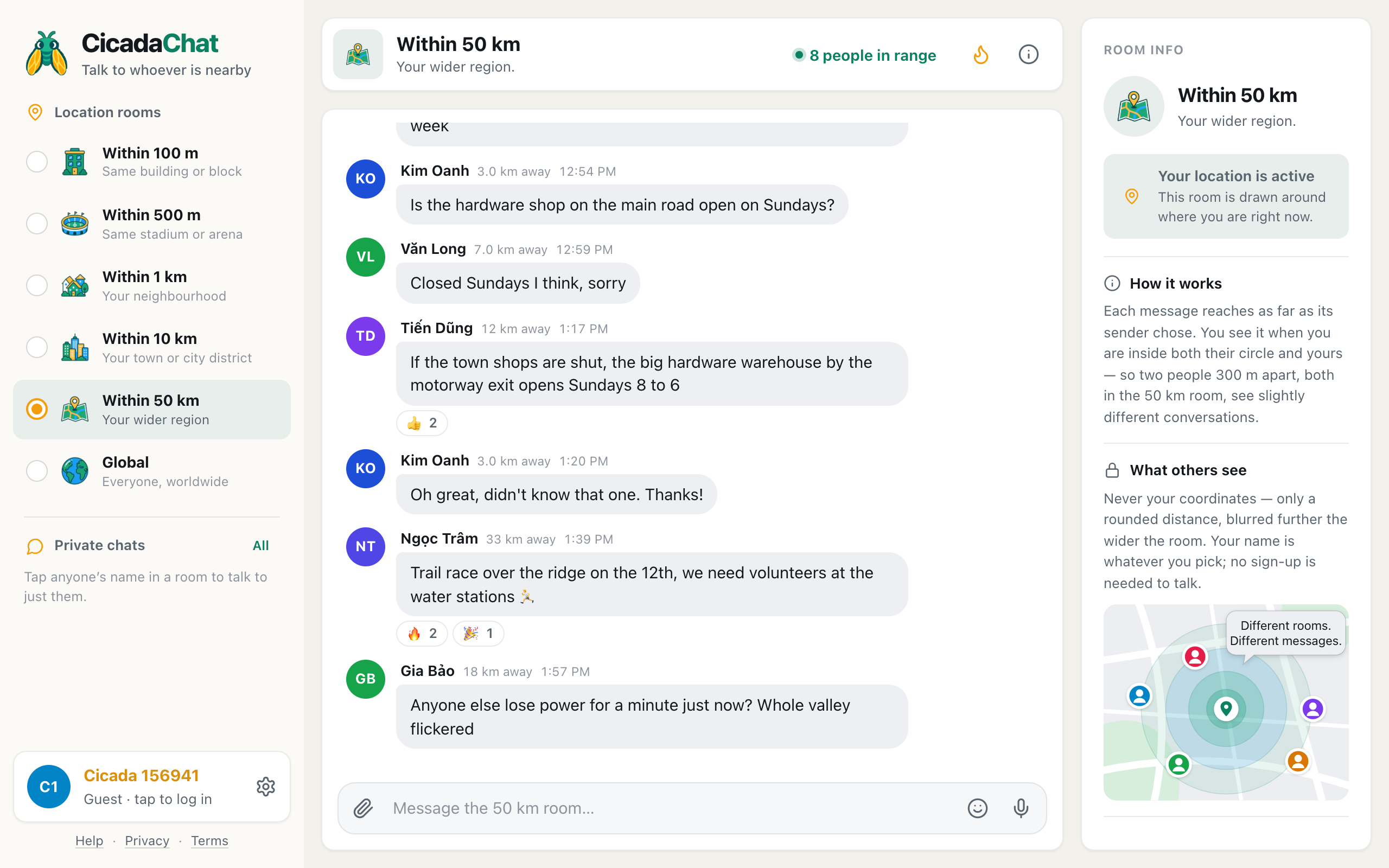
In the room list it's called Within 50 km, with Your wider region underneath, and the room header says the same: Your wider region.
A circle with a radius of 50 km is a hundred kilometres across and covers nearly 8,000 square kilometres. That's a whole province or county in many countries. Around a big city, it takes in the city itself, its suburbs, the satellite towns, the airport, the industrial parks and a good stretch of the countryside beyond. Out in the country, it's several market towns, dozens of villages, the hills or the coast, and the roads that link them. Most people inside it can reach each other in an hour or so by road, which is what makes it a region rather than just a big number.
You don't need an account. The first time you open CicadaChat, it creates a guest account for you, with a name like Cicada 655839, and starts you in the 1 km room once your browser shares your location. The 50 km room is one tap away.
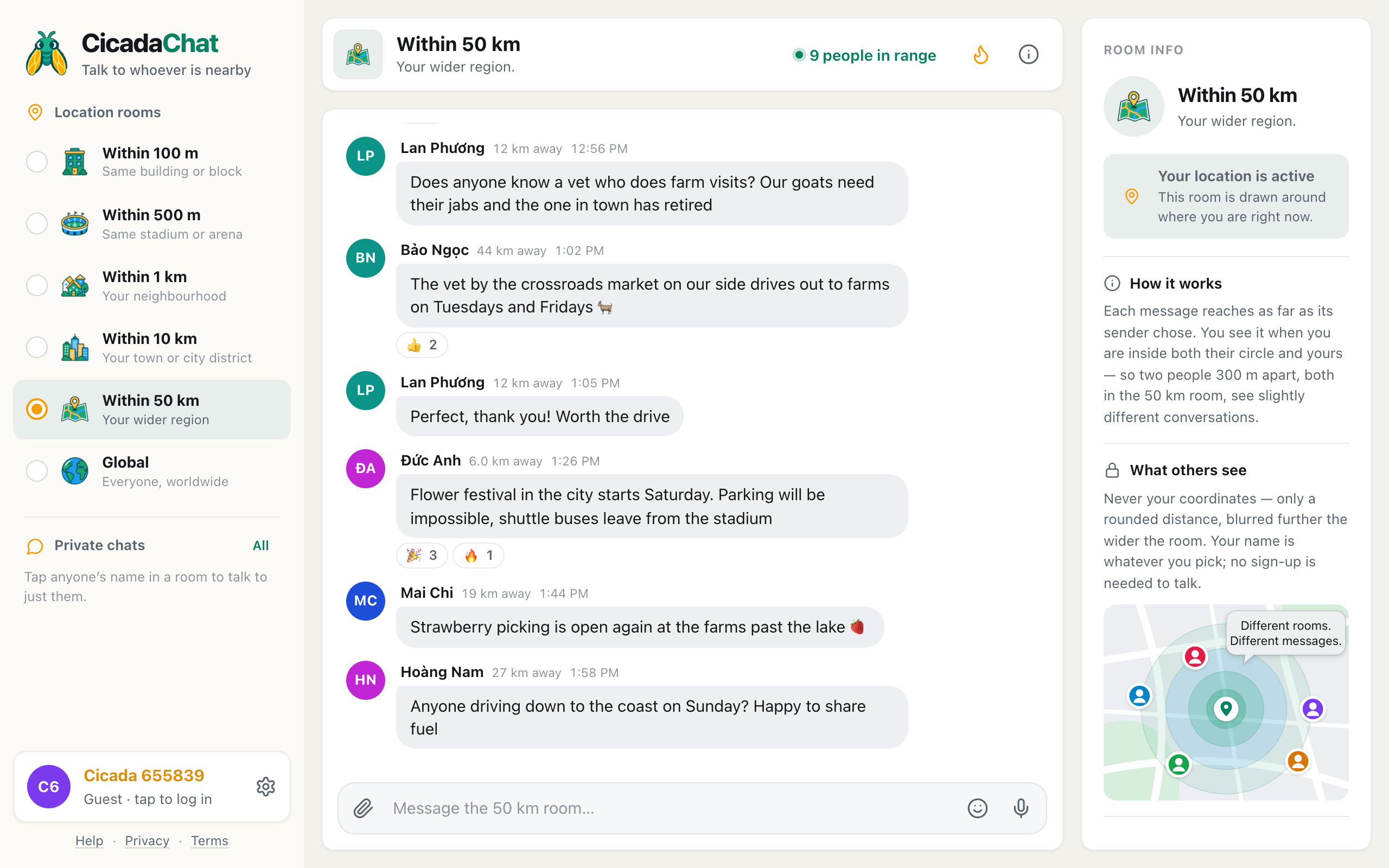
A screenshot of the 50 km room on a computer. Within 50 km is selected in the Location rooms list, the header shows 9 people in range, and messages come from 6 to 44 km away.
How to get to the 50 km room
- Allow location when your browser asks. The 50 km room is drawn around where you are, so CicadaChat needs to know.
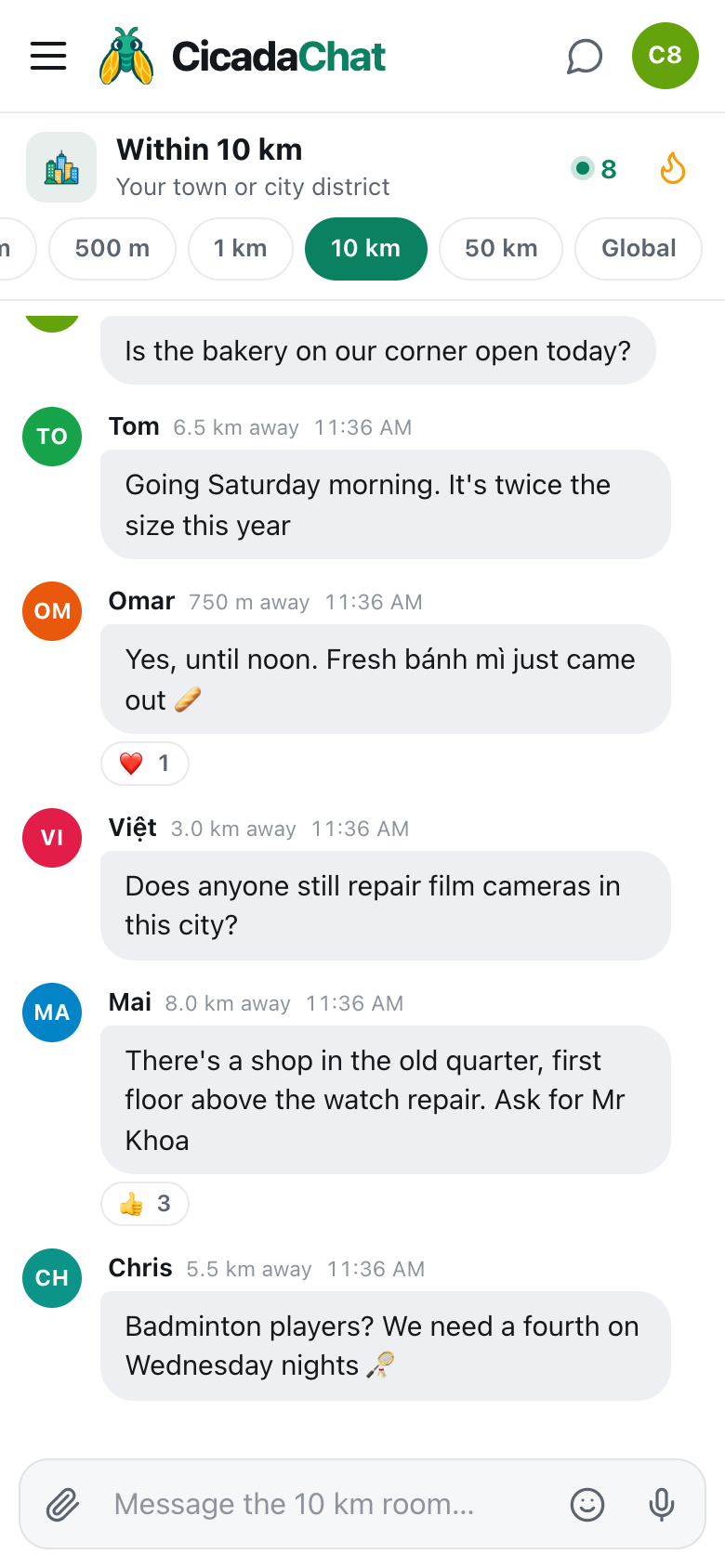
- On a phone, tap the 50 km tab in the row of room tabs under the header. It's the fifth one, just before Global.
- On a computer, click Within 50 km in the Location rooms list on the left.
- Wait a moment while CicadaChat fetches what people around you have been saying.
- Type into the box at the bottom, which now says Message the 50 km room…, and press send.
If the tab is greyed out, CicadaChat doesn't have your location. On a computer, hovering over it shows Share your location to use this room. Until you allow it, you're in the Global room.
CicadaChat remembers the room you pick on each device. If the 50 km room becomes the one you check most, perhaps because you live somewhere quiet, it's where the app opens next time.
Who hears you, and whom you hear
Every message remembers where it was sent from and which room its sender was in. A message you send from the 50 km room reaches 50 km around the spot where you sent it. Someone sees it when they're inside your circle and also inside their own. Put simply, a message shows up when the distance between you is no more than the smaller of the two rooms.
At this size, that rule decides a lot. Here's how it plays out across a region:
- Someone 30 km away, also in the 50 km room, sees your message. You're inside each other's circles.
- Someone 30 km away in the 10 km room doesn't. They've chosen to hear only what's said within 10 km of them.
- Someone 6 km away in the 10 km room does see it. You're inside their 10 km circle, and they're inside your 50 km one.
- Someone 800 m away in the 1 km room sees it too, for the same reason.
- Someone 60 km away in the 50 km room doesn't. They're outside your circle, even though you're both in the same size of room.
- Nobody in the Global room sees it. Global is its own world, and local messages never appear there.
So a message in the 50 km room reaches everyone within 50 km who is listening that wide, plus the people near you who are listening more narrowly. It doesn't flood every town's 10 km room or every neighbourhood's 1 km room. That's deliberate: people who chose a small room chose a small room, and CicadaChat doesn't let a whole region shout into it.
In the other direction, the 50 km room is the widest local view you can have. Sitting in it, you hear every 50 km message from within 50 km, every 10 km message from within 10 km, and every smaller room's messages from people close enough to be inside their own circles. Nothing said in your 1 km or 10 km room disappears when you step up. It just gets company.
Because every circle is centred on a different person, no two people see quite the same 50 km room. Someone at the northern edge of the region and someone at the southern edge share the middle, but each sees their own far side. The help article why two people in the same room can see different messages walks through it with examples.
What you see in the room
Each message shows the sender's name, how far away they were when they sent it, and the time. In the 50 km room, distances are rounded to the nearest kilometre before they leave CicadaChat's server. Under 10 km you'll see a figure like 6.0 km away; beyond that, whole numbers like 19 km away or 44 km away. Anyone within about 500 m of you shows as right here. The rounding is coarse because a regional room can afford it. Nobody needs to know whether the person reporting fog on the pass is 27 or 27.4 km away, only that they're up in the hills and you're not.
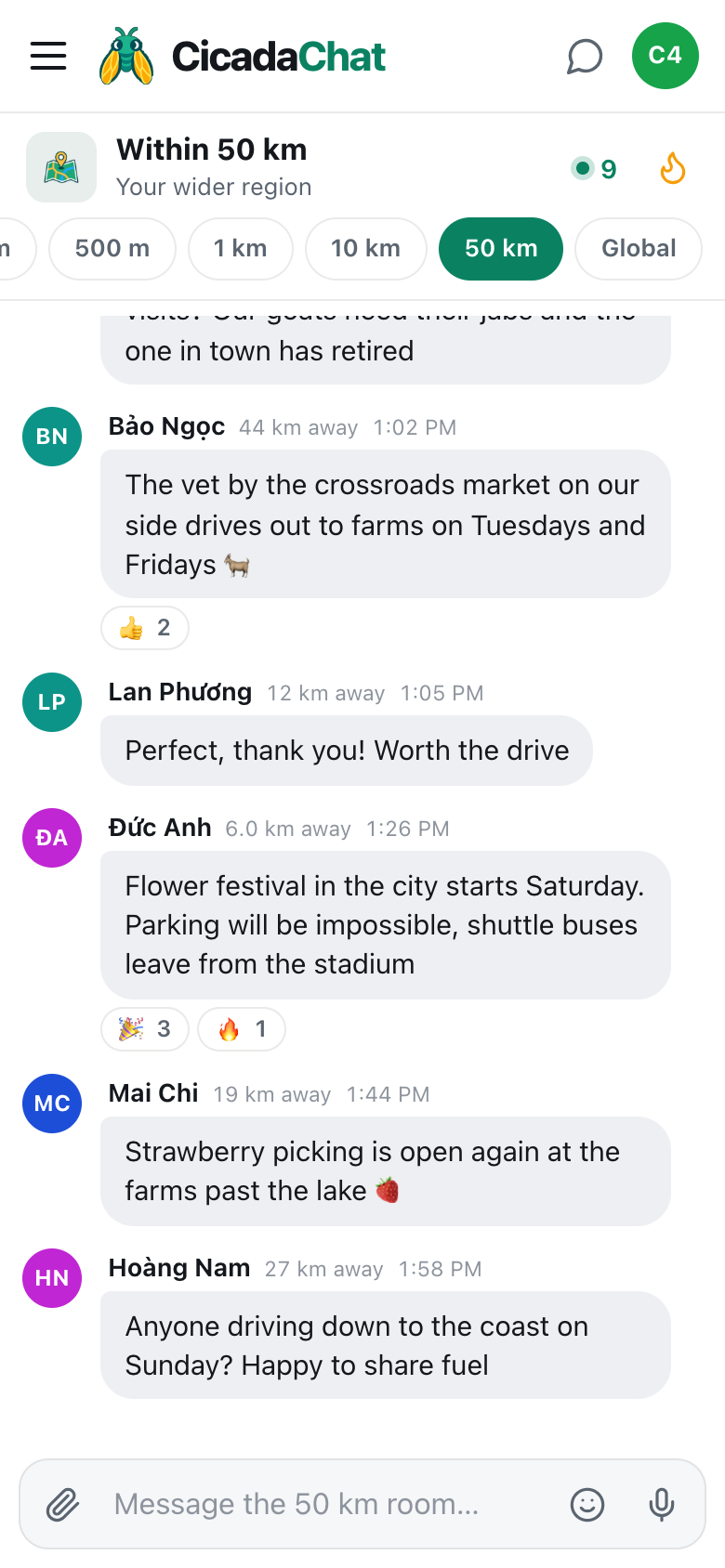
A screenshot of the 50 km room on a phone. The 50 km tab is highlighted, and distances are whole kilometres, such as 19 km away or 27 km away.
In the header, the green dot and number are people in range: how many people are online now and would hear you if you spoke, you included. On a computer it's spelled out, like 9 people in range. Tap it to open the People in range list, nearest first. In a busy region the list shows the nearest hundred. Tap anyone there, or anyone's name on a message, to start a private chat with just them.
Beside it is the flame button, Hot, which shows the room's most-reacted messages from the past week. In a regional room, Hot collects the things a whole province finds useful: the festival dates, the road that's closed until Friday, the vet who drives out to farms.
To read further back, scroll up. Older messages load as you reach the top, or press Load older messages.
The room follows you, slowly
Because the room is a circle around you, it moves when you do. New messages reach you based on where you are now, and each message's distance is measured from where you were when it arrived.
At 50 km, that movement is gentle. Walking across town doesn't change your 50 km room in any way you'd notice, and even driving to the next town leaves most of it in place. It changes on a real journey: an hour's drive down to the coast, a trip to the capital, a weekend in the mountains. That makes the 50 km room useful on the road. As you travel, the region ahead of you comes into range and the region behind you drops away.
What people use the 50 km room for
Roads and journeys
Mountain passes, motorways, ferries, fog, landslides, a petrol station that's run out of diesel. Long journeys cross more than a town, and the 50 km room covers the whole route of most of them.
Weather
Storms, floods, heat and smoke don't stop at the edge of town. Someone 35 km upstream telling you how fast the river is rising is worth more than any forecast.
Services that cover a region
Vets who visit farms, mechanics who come out to you, specialist doctors, the only hardware warehouse open on Sundays. In the country, many services cover a whole district, and the 50 km room is where you find them.
Lifts and day trips
A spare seat to the airport, a lift back from a concert in the city, whether the waterfall trail is open after the rain. The region is the natural size for trips.
Rare interests
Astronomy, the game of Go, a language few people speak where you live. A town might have one other person who shares your hobby. A region may have enough of them to start something.
Quiet places
In the countryside, the smaller rooms can be empty for days. The 50 km room gathers the farms, villages and small towns around you into one conversation that's actually awake.
What you can send
- Messages of up to 2,000 characters, with emoji.
- Reactions: 👍, ❤️, 😂, 😮, 😢, 🔥, 🎉 and 👀. Reactions are what put a message into Hot.
- Photos and documents, from the paperclip button. Photos are resized and re-encoded on your device, which strips the hidden location data many phone cameras add.
- Voice notes, from the microphone button. They're handy when you're pulled over at the side of the road and typing is a chore.
- Your location, from the paperclip's Location option. It's the only time anyone sees an exact spot, and CicadaChat warns you first: Everyone within 50 km will see this exact spot. In a room this size, that's the largest local audience there is, so share a meeting point, never your home.
There's no way to edit or delete a message after you've sent it, so read it through before pressing send.
How the 50 km room compares with its neighbours
The 10 km room is your town or city district, a short ride. The 50 km room is your wider region, where a trip takes planning. Global is everyone, everywhere, with no distances at all. If the 50 km room is busy with talk about places you never go, step down to 10 km. If you want to reach people you'll never be near, Global is the place. The help article choosing a room: 100 m, 500 m, 1 km, 10 km, 50 km or Global compares all six, and 10 km or 50 km? How to tell when it's time to go regional looks at the choice between these two in detail.
Good manners in a regional room
- Name the place. "The bridge" or "the market" means nothing across 100 km. "The bridge on the coast road" or "the Tuesday market in the hill town" does.
- Say when. Regional news goes stale quickly. "Pass road clear as of 2pm" is far more useful than "pass road clear".
- Write for strangers. A 50 km room can hold a lot of people, most of whom you'll never meet. Keep it clear, kind and useful.
- Describe places, not people. A road, a queue or a shop is fine. A description of someone isn't.
- Keep personal details for private chats. Addresses, phone numbers and plans to meet belong in a one-to-one conversation.
- React to good answers. A 👍 on the reply that turned out right tells the next person which one to trust, and lifts it into Hot.
Guests and registered accounts
Everything in this article works as a guest. A free account lets you choose your name, sign in on any device, add friends, who see when you're online but never where you are, and create private rooms: invite-only chats that aren't tied to location. That matters more in a regional room than anywhere else, because the people you meet here can live an hour apart. A private room keeps a group together however far its members are from each other. Creating an account keeps your guest history, so nothing you've already said is lost.
No comments yet. Start the conversation.