
At the school gate: the 1 km room for parents around a school
Closures, lost water bottles, the school run and road safety: how parents use CicadaChat's 1 km room around a school, and how to keep children's details out of a public room.
Is the school closed on Monday? Whose water bottle is on the railing? Does anyone walk from the canal side at 7.40 and fancy sharing the school run? Every school gate runs on questions like these, and the answers are usually in the heads of the parents who live nearby. Most families live within a kilometre or so of their primary school, and so do most of the other parents. That makes CicadaChat's 1 km room a natural place for parents around a school: a conversation with the whole neighbourhood, including the families who walk the same route every morning. This article covers what parents use the 1 km room for, how to keep children's details safe in a room anyone nearby can read, and how to move the right conversations to private chats and private rooms.
Why the 1 km room fits a school's families
Primary schools draw most of their children from the streets around them. A circle with a radius of a kilometre, drawn around the school gate or around your home, usually takes in most of the families you see at pick-up. The 1 km room is exactly that circle, centred on you. You don't need to know anyone's number or be added to a class group. If you're a parent within a kilometre of other parents, you're already in the same conversation.
That's different from a class group, and it's useful in different ways. A class group has 30 families in it. The 1 km room has the whole neighbourhood: parents from other classes and other schools, grandparents who do the pick-up, the crossing patrol, the shop opposite the gate. It's the place for questions that go beyond one class.
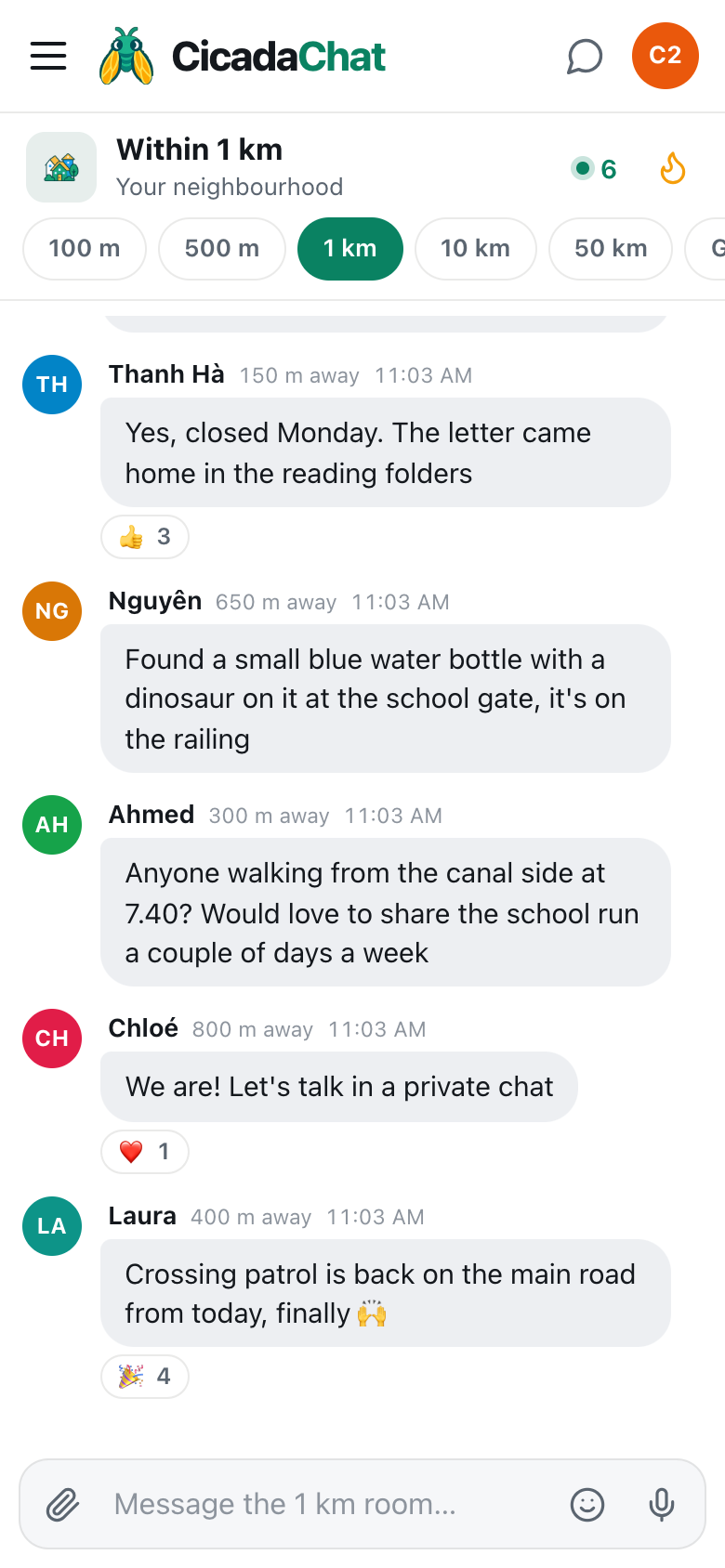
A screenshot of parents in the 1 km room. They confirm a training day, report a lost water bottle and arrange to share the school run, between 150 m and 800 m apart.
What parents use it for
Quick checks
"Does anyone know if the primary school is closed on Monday for the teacher training day?" The letter came home in a reading folder that's now at the bottom of a rucksack. Someone in the neighbourhood has read theirs. These questions are the 1 km room at its best: easy to ask, answered in minutes, and a 👍 from other parents confirms the answer.
Lost property
Water bottles, lunch boxes, a single glove, a cardigan with no name in it. "Found a small blue water bottle with a dinosaur on it at the school gate, it's on the railing" gets it home by the next morning. Describe the thing, not the child you think it belongs to.
Sharing the school run
"Anyone walking from the canal side at 7.40? Would love to share the school run a couple of days a week." A walking group or a shared lift saves everyone time, and the neighbourhood is exactly where to find one. The first message can go in the room. Everything after it belongs in private.
Road safety news
"Crossing patrol is back on the main road from today, finally 🙌" A new crossing, roadworks on the route to school, a car park that's closed, a lollipop person on holiday. Local, practical, and useful to every family who walks that way.
After school and holidays
Which parks have shade in summer, which library has a story time, which swimming pool has lessons for beginners, who runs a holiday club, which café has space for a buggy. Parents are some of the best local guides a neighbourhood has.
Passing things on
School uniforms in the next size, reading books, a bike with stabilisers, a cot that's no longer needed. Children outgrow things faster than they wear them out, and another family round the corner is usually one size behind.
Not just parents
The school run isn't only done by parents. Grandparents, childminders, older brothers and sisters and au pairs all stand at the gate, and they're all in the same 1 km room. Many of them are exactly the people who don't get added to a class group, and who most need to know that Monday is a training day.
The 1 km room is also a good place for parents of babies and toddlers, before school starts: which playgroups are friendly, which cafés have space for a buggy, which park has a fenced playground, which doctor is good with small children. And it's a gentle way in for families who've just moved, and don't know the school, the area or anyone at the gate.
Keeping children safe in a public room
The 1 km room is public to everyone within a kilometre of you. That's what makes it useful, and it's why children's details need care. A few firm rules:
- Never post a child's name together with their school, class or route. "Anyone walking from the canal side at 7.40?" is fine. "My daughter Mai, Year 2, walks alone from the canal at 7.40" is not.
- Never post photos of children in a public room. Not yours, and certainly not other people's. A photo of a lost water bottle is fine. A photo of the class assembly is for the class's own private channels.
- Keep times and routes general. "Morning school run from the canal side" is enough to find a walking buddy. Exact times, exact meeting points and which days a child is on their own are details for a private chat.
- Don't share your exact location from home. The paperclip's Location option sends a map of exactly where you are, and CicadaChat warns you before you send it: Everyone within 1 km will see this exact spot. From home, that's your home. The help article how to share your location in a message, and who will see it explains who sees it where.
- Talk about places, not families. "The crossing on the main road is dangerous at pick-up" is a useful message. Comments about another family, another child, or a teacher are not, and the people concerned may be reading.
CicadaChat helps in the background: nobody in the room sees your coordinates, only a rounded distance, and photos are re-encoded on your device before sending, which removes the hidden location data many phones add. But what you write is up to you, and it's what matters most. For more on what the room shows, see privacy in your neighbourhood: what the people within 1 km can and can't see.
Moving to a private chat
When a conversation in the room gets specific, like arranging who walks which children on which days, take it private. Tap the other parent's name, on their message or in the People in range list, to open a private chat with just them. "We are! Let's talk in a private chat" is exactly the right reply.
A private chat shows no distance at all, and keeps working wherever you both are, so you can confirm tomorrow's walk from the office. Before trusting someone with the school run, take the usual care: meet at the gate first, and get to know each other before sharing routines.
A private room for a walking group or a class
If a few families end up sharing the school run, a private room gives the group its own space. It's an invite-only chat that only its members can read, and it works from anywhere, not just within a kilometre. It's a good place for "running five minutes late", "Mai's off sick today" and "who's got the rota for next week?", the details that should never go in a public room.
Private rooms need a registered account, which is free, and the person who creates the room can add only their accepted friends. So nobody can be pulled into a parents' room by someone they don't know. For how to set one up, from the first message in the neighbourhood room to the private room itself, see from the 1 km room to a private room: starting a running club, a book club or a street group.
Which room when
- 100 m if you live in a big apartment block and want only the families in your building.
- 500 m at the school itself, if it's a big campus, and you want just the people there right now.
- 1 km for the neighbourhood's families, from home or from the gate.
- A private chat for arrangements with one family.
- A private room for a walking group or a small group of parents who've got to know each other.
The room you're in decides both who hears you and whom you hear. A message from the 1 km room reaches 1 km around the spot where you sent it, so a question sent from the school gate reaches the families around the school, while the same question sent from your office across town doesn't.
A note for teachers and school staff
School staff live in neighbourhoods too, and some will see what's said in the 1 km room. That's a good reason to keep complaints about a school for the proper channels, and to keep the room for what it does well: practical, friendly, local help. Official announcements, like closures, should always come from the school itself. The 1 km room is where parents remind each other to check.
Getting started
Next time you're at the gate, open CicadaChat. You'll land in the 1 km room, with the people around the school in it. Ask something small, like whether anyone knows when the summer fair is, or answer someone else's question. Within a few weeks, the names in the room will match the faces at the gate.
No comments yet. Start the conversation.