
From the 1 km room to a private room: starting a running club, a book club or a street group
How a message in CicadaChat's 1 km room becomes a club with a room of its own: finding people, becoming friends, creating a private room and keeping both rooms healthy.
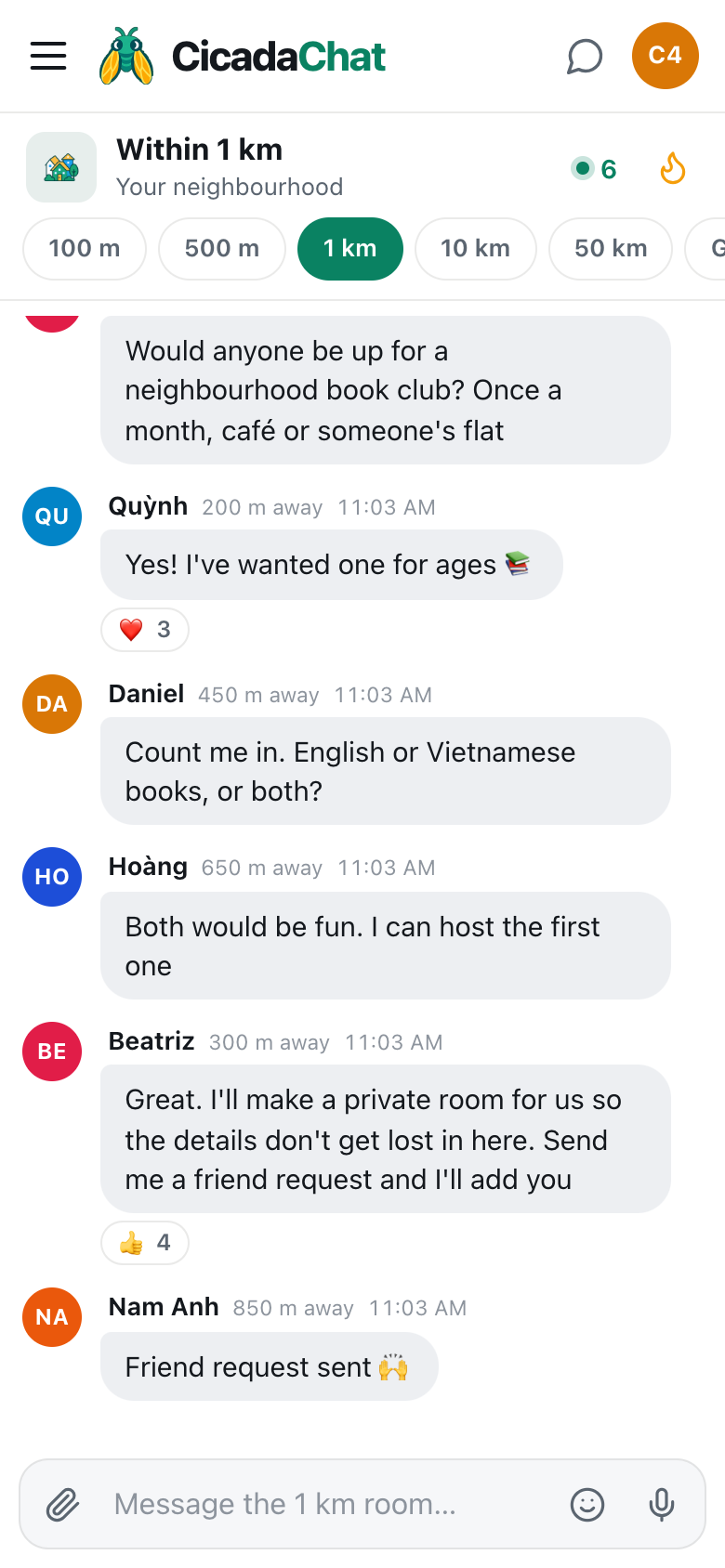
It usually starts with one message. "Would anyone be up for a neighbourhood book club?" A few people say yes. Someone offers to host. Someone asks whether the books will be in English or Vietnamese. And then, a few messages in, the question every new group reaches: where do we talk about this, so the details don't get lost among the roadworks and the lost cats? CicadaChat's answer is a private room. This article explains how to go from the 1 km room to a private room: how a neighbourhood conversation turns into a running club, a book club or a street group with a space of its own, step by step, and how to keep both the group and the neighbourhood room healthy afterwards.
Why groups start in the 1 km room
A book club needs people who can get to the same café on a Thursday evening. A running club needs people who can meet at the same park gate at 6.30. A street group needs people on the same street. All of them need neighbours, and the 1 km room is where the neighbours are: everyone within a kilometre of you, a short walk in any direction, in one conversation.
What the 1 km room isn't good at is being a group's home. It's public to everyone within a kilometre, so the book club's address and the running club's meeting times would be visible to hundreds of people. It moves with you, so on holiday you'd lose the conversation. And it's shared with the rest of the neighbourhood, who don't need forty messages about which novel to read next.
A private room solves all three. It's an invite-only chat, which CicadaChat describes as A group chat for people you know, wherever they are. Only members can read it, and you choose who is in.
A screenshot of a book club forming in the 1 km room. Four neighbours say yes, one offers to host, and the organiser suggests a private room and asks for friend requests.
Step 1: find your people in the 1 km room
Suggest something specific. "Would anyone be up for a neighbourhood book club? Once a month, café or someone's flat" gives people enough to say yes to. The same goes for "Saturday 5k from the east gate at 6.30, all paces" or "Anyone on the canal side want a street group for bins, parcels and parties?".
Give it a day. Replies and reactions tell you how much interest there is: a message with ❤️ 3 and three "count me in"s is a club. Reactions are counted, not named, so ask the interested people to reply too.
Step 2: create free accounts
Private rooms and friends are for registered accounts only. A guest account lives in one browser and can disappear if the browser's data is cleared, which is no foundation for a club. Creating an account is free, and it upgrades your guest account in place, so everything you've said as a guest stays yours.
Ask the people who want to join to register too. They'll need to, before they can be added.
Step 3: become friends
Only friends can be added to a private room. That's deliberate: it means nobody can be pulled into a room by a stranger. So the organiser and each member need to be friends first.
- Tap a member's name, on one of their messages or in the People in range list. A private chat with them opens.
- Use Add friend. The button changes to Requested while you wait.
- When they accept, it becomes Friends.
It works the other way round too. In the screenshot, the organiser asks people to send her a friend request, and "Friend request sent 🙌" is the reply. If two people send each other a request at the same moment, they simply become friends. The help article friend requests: adding, accepting, declining and removing friends covers every case.
Friends see when each other are online, never where they are or how far away. That holds even if you're both in the 1 km room.
Step 4: create the private room
- Open the sidebar and find Private rooms. On a phone, tap the menu button at the top left first.
- Press New, beside the Private rooms heading. The New private room dialog opens.
- Type a Room name, like "Canal Book Club" or "East Gate Runners".
- Under Add friends, tick the people to add.
- Press Create room.
If you have no friends to add yet, CicadaChat says so, You have no friends to add yet. Create the room now and add people once you are friends., and you can create the room empty and add people later. For every detail, see how to create a private room for people you know.
Step 5: say so in the 1 km room
Once the room exists, tell the neighbourhood room it's there, without the details: "Book club's up and running, first meeting next month. If you'd like to join, send me a friend request." New neighbours will keep finding the group this way, and the details stay in the private room.
What goes where
Once the group has a room of its own, a simple rule keeps everyone happy:
- In the private room: meeting times and places, whose flat, who's bringing what, the reading list, "running late", "rain today, shall we skip?", photos of the group.
- In the 1 km room: the occasional invitation for new members, and things the whole neighbourhood might enjoy, like "the running club is doing a litter pick on Sunday, all welcome".
- In a private chat: anything between two people.
A private room works from anywhere. It doesn't depend on distance, so the book club keeps talking when someone is away for work, and the running club can plan a race in another city. Messages there show no distance at all.
Everything you can send in a room works in a private room too: photos, documents, voice notes, reactions and locations. When someone shares a location in a private room, only the members see it.
Running the room
The person who creates a private room is its owner. From the room's settings, the owner can:
- Rename the room.
- Add more friends, up to 50 members in all.
- Remove someone, if they've moved away or it isn't working out.
- Delete the room, if the group has run its course.
Anyone can leave a room at any time with Leave room. If the owner leaves, the longest-standing member becomes the new owner, so the club outlives its founder. A room that everyone has left is deleted. And to anyone who isn't a member, the room doesn't exist at all: outsiders can't see its name, its members or even that it's there. The help article managing a private room: adding and removing people, renaming, leaving and deleting covers each of these.
If something doesn't work
- There's no Add friend button next to someone. They're probably a guest. Friends are for registered accounts only, so ask them to create a free account first.
- Someone isn't in the list under Add friends. You aren't friends yet. They may not have accepted your request: in their private chat, the button still says Requested.
- You can't see Private rooms in the sidebar, or can't create one. You're using a guest account. Create a free account and it appears.
- A member says they can't see the room. Check that they're signed in to their registered account on that device, not using a new guest account in another browser.
- Only the owner can add people. If someone else wants to invite a friend, ask the owner to do it. They'll need to be friends with the owner first.
Kinds of neighbourhood groups
Clubs
Book clubs, running clubs, walking groups, board game nights, a choir, a language exchange, a knitting circle. Anything that meets regularly and needs a place to say "same time next week?".
Street and building groups
The neighbours on one street, or in one building, who want to sort out bins, parcels, repairs and the occasional party. The 100 m room is often where these start. The steps are the same whichever room a group starts in.
Practical groups
A school-run rota, a lending library of tools, a group of parents sharing childcare, neighbours looking in on an older resident. These are the groups where a private room matters most, because the details are personal.
One-off groups
A street party, a litter pick, a surprise birthday for a neighbour. Make a room for the planning, and delete it, or just leave it, when it's done.
Keeping it friendly and safe
- Meet in public first. A café or the park before anyone's flat.
- Keep numbers sensible. A book club of eight works. A book club of fifty doesn't. Start a second room rather than stretching one.
- Remember messages are permanent. There's no editing or deleting a message once it's sent, in a private room as anywhere else.
- Keep the door open. The best neighbourhood groups keep inviting new people from the 1 km room. That's where they came from, after all.
One message in the neighbourhood room, a few friend requests and a room name: that's all it takes to turn a handful of neighbours into a club.
No comments yet. Start the conversation.