
How to delete your CicadaChat account
Delete your CicadaChat account, or your guest data, from Your account or Settings on the web and in the Android app. What is removed, what stays, and what to do if you can't log in.
You can delete your CicadaChat account at any time, from the app itself, in under a minute. Deleting is immediate and permanent: your account, everything you have said and every file you have sent are gone for good, and there is no undo. This guide shows how to delete your CicadaChat account on the web and in the Android app, how to delete your data if you chat as a guest, exactly what is removed and what stays, and what to do if something gets in the way.
How to delete your CicadaChat account
These steps are for a registered account, the kind with a username that you log in to. If you have never created an account, you are a guest: skip to If you chat as a guest below.
- Open cicadachat.com and make sure you are logged in to the account you want to delete.
- Click your name at the bottom of the sidebar, or your photo at the top right on a phone. Your account opens.
- Scroll to the bottom, past Password, to Delete account.
- Read the short note under it. It lists what goes, and it means it.
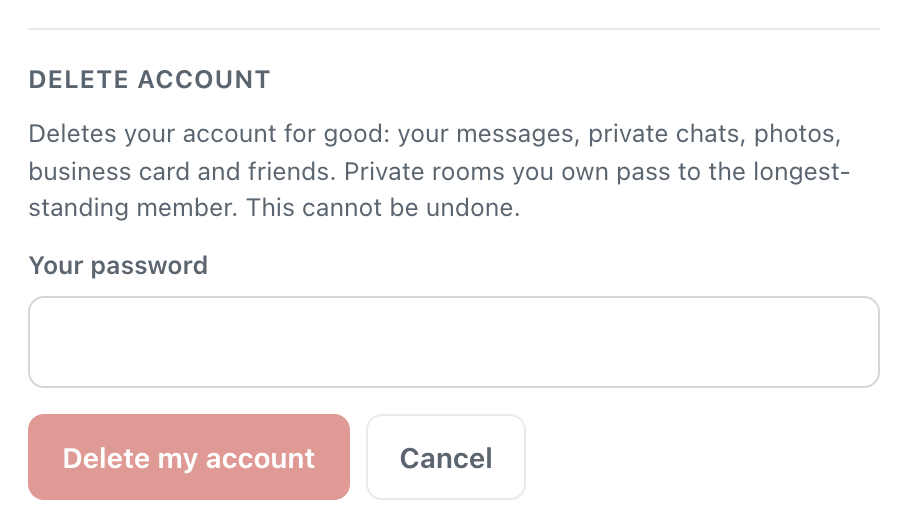
- Press Delete my account…. A field appears below the note.
- Type your password in Your password.
- Press the red Delete my account button.
A screenshot of Delete account at the bottom of Your account, after pressing Delete my account…. The red button only lights up once you type your password.
The button stays pale until you have typed something in the field, so it can't be pressed by accident. If you change your mind, press Cancel and nothing happens.
Once you press it, the dialog closes and CicadaChat briefly shows Warming up… while it starts a fresh session. You land back in a room as a brand-new guest with a new random name, such as Cicada 482913. That guest has no history and no link to the account you just deleted. Any other phone or computer that was logged in to the account is disconnected at the same moment, and becomes a new guest the next time CicadaChat is opened there.
If you signed up with Google
An account created with Continue with Google may never have had a password. In that case the field reads Type DELETE to confirm instead of Your password: type the word DELETE (capitals or not) and press Delete my account. If you added a password to your Google account later, CicadaChat asks for that password like any other account.
Deleting your CicadaChat account doesn't touch your Google account. Google keeps a note that you once signed in to CicadaChat, which you can remove in your Google account's security settings under third-party connections if you want to tidy that up too.
Deleting your account in the Android app
The Android app works the same way, with the same labels:
- Tap your photo at the top right. Your account opens.
- Scroll down to Delete account, just above Sign out.
- Tap Delete my account….
- Type your password in Your password, or DELETE in Type DELETE to confirm if your account only uses Google.
- Tap Delete my account.
The app goes back to the room as a new guest, just as the web does. You don't have to delete in the same place you signed up: an account made on the web can be deleted from the app, and the other way round. Uninstalling the app on its own does not delete your account. Your account lives on CicadaChat's server, so it is still there, and you can log in to it again from any device, until you delete it with the steps above.
If you chat as a guest
A guest has no password and no email, but it is still an account: a name, the messages you sent, and any private chats you had. You can delete all of that too. Settings calls it Your data. If you are not sure which kind you are, see guest or registered account: what's the difference?
- Open Settings. On a computer, click the gear next to your name at the bottom of the sidebar. On a phone, tap the menu button at the top left, then the gear at the bottom of the menu. In the Android app, it's the same menu and the same gear.
- Scroll to Your data.
- Press Delete my data….
- Type DELETE in Type DELETE to confirm.
- Press Delete my data.
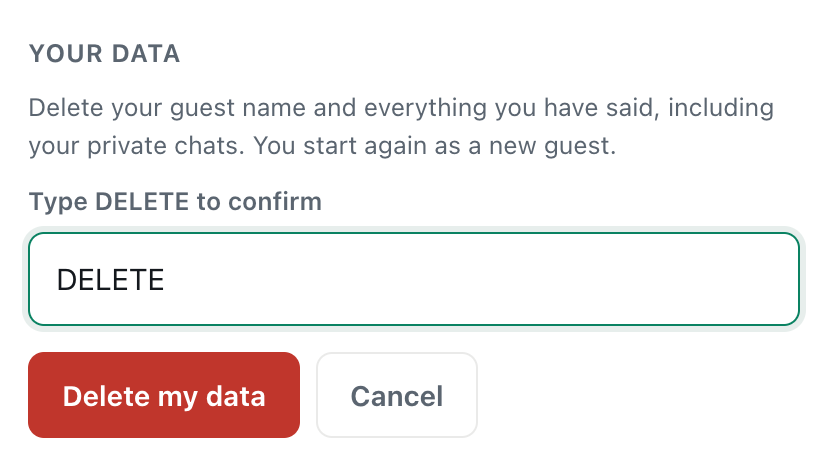
A screenshot of Your data in Settings, for guests. Typing DELETE is what turns the button on.
You start again straight away as a new guest with a new name. CicadaChat also forgets the identifier it kept for your browser or phone, so the new guest really is new: it can't be tied back to the one you deleted.
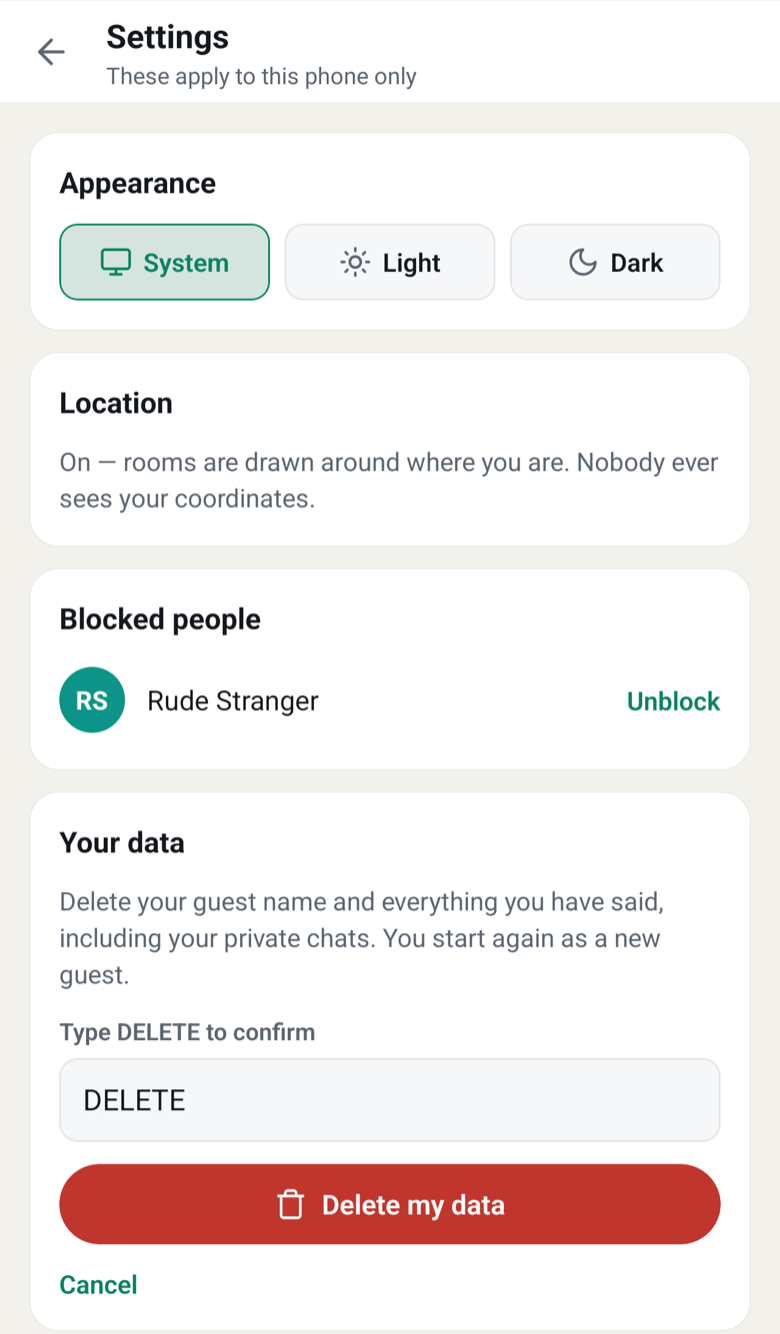
A screenshot of Settings in the Android app. Your data sits below Blocked people, with the same Type DELETE to confirm step as on the web.
Registered accounts don't see Your data in Settings. For them, deleting lives in Your account, behind the password, so that someone who picks up your unlocked phone can't wipe your account with one tap.
What deleting your account removes
Everything that belongs to the account is deleted at once:
- Your profile: your username, full name, email address, password and profile photo.
- Everything you said in rooms: messages in every distance room and in Global, however old. People who have the room open see your messages disappear while they watch.
- Your private chats, on both sides. A private chat belongs to both of you, so when you delete your account the whole conversation goes, including what the other person wrote in it. Keep that in mind if someone might want to keep what you discussed.
- Your messages in private rooms. The room itself carries on for its other members; only what you wrote goes.
- Your files: photos, voice notes and documents you sent, deleted from storage, not just hidden.
- Your reactions: the counts on other people's messages drop by one wherever you had reacted.
- Your business card and its photos.
- Your friends and friend requests, and the list of people you blocked.
Your username and email address become free again. Someone else could take the username later, and you could register the same email for a new account.
Private rooms you own
If you own a private room, deleting your account doesn't delete the room. Ownership passes to the member who has been in it the longest, exactly as if you had left it yourself, and everyone else stays. If you were the only member, the room is deleted. If you would rather hand a room to someone in particular, or delete it for everyone first, do that before you delete your account: see managing a private room.
What stays after you delete your account
- Reports. If you reported someone, or someone reported you, the report stays so that moderation decisions can be looked back on. A report keeps a copy of the reported message and the names shown at the time, but it is no longer linked to an account.
- Things other people saved. CicadaChat can't reach a screenshot someone took, or a photo you sent that they saved to their phone.
- Comments on this blog. The blog is separate from the chat, so comments you left here aren't affected.
The Privacy Policy describes what CicadaChat stores and for how long.
If something goes wrong
- Your current password is not right. The password you typed doesn't match the account. Check that you are logged in to the account you mean to delete, and watch for caps lock. If you have forgotten it, reset it first, then come back.
- Rate limit exceeded after several tries. For safety, CicadaChat only allows a few password attempts in a short time. Wait about 15 minutes and try again.
- Cannot reach CicadaChat. Check your connection. Your phone or computer is offline, or the connection dropped. Nothing was deleted. Try again once you are back online.
- The red button won't press. It waits for your password, or for the word DELETE. A space before or after DELETE is fine; a different word is not.
- You don't see Delete account. You are chatting as a guest. Use Your data in Settings instead.
If you can't log in any more
You need to be logged in to delete an account, which is what stops anyone else from deleting yours. If you have lost your password, follow how to reset your password: the reset link goes to the account's email address, and once you are back in you can delete the account as above. If you signed up with Google, log in with Continue with Google and type DELETE when asked.
If you can't get into the account at all, for example because you no longer have that email address, write to support@cicadachat.com from the address the account uses, if you still can, and say which account you want deleted.
Guests are different. A guest session lives in one browser or one phone. If you have already cleared the browser's data or uninstalled the app, that guest can't be opened again, and there is no way for anyone to prove which guest was yours. If you want a guest's messages gone, delete them with Your data before you clear anything.
Deleting isn't the only option
If what you want is a break, or to get away from one person, something smaller may do:
- Log out. On the web, Sign out at the bottom of Your account; in the Android app, Log out. Your account and history wait for you, and you carry on as a guest.
- Block someone. You and they stop seeing each other's messages and can't message each other. They aren't told.
- Change your name or photo in Your account, if you would rather not be recognised.
- Remove your business card, if that is the only thing you want off the app.
Questions about deleting your account
Can I get my account back after deleting it?
No. Deletion happens the moment you press the button, with no waiting period, and nothing can be restored. You can create a new account whenever you like, but it starts empty.
Will I get an email confirming the deletion?
No. The account's email address is deleted along with everything else, so there is nowhere to send one. Seeing yourself back in the room as a new guest is the confirmation.
Does deleting my account delete my messages for other people?
Yes. Your messages disappear from every room, private room and private chat, for everyone, including the whole of any private chat you were part of.
Is uninstalling the app enough?
No. Uninstalling removes the app from your phone, not your account from CicadaChat. For a registered account, log in anywhere and delete it. For a guest, delete your data before you uninstall.
No comments yet. Start the conversation.