
A lost dog doesn't stop at 1 km: searching across town in the 10 km room
When a lost pet or a lost thing has left the neighbourhood, ask the town. How to write a lost pet post, report sightings, hand over safely and search across town in the 10 km room.
A frightened dog can cover three kilometres in an hour. A cat that slipped out of a carrier at the vet can end up across a canal. A phone left in a taxi travels with the taxi. When what you've lost has left your neighbourhood, you need to ask the whole town, and quickly. This article is about searching across town for a lost pet or a lost thing with CicadaChat's 10 km room: when to widen the search, how to write a post people will act on, how to report a sighting, and how to get your dog home safely, with a real-looking example from start to finish.
Start close, then go wide
Most lost pets are found close to home, so start small. The 1 km room is your neighbourhood, and the 100 m room is your block. If your cat has just gone missing from the flat, the people who can check their stairwells and balconies are the ones in those rooms. The 100 m article lost a cat, found a key: using the 100 m room for lost and found on your block covers that first hour.
Widen the search to the 10 km room when:
- your pet was lost away from home, on a walk, at the vet's, in a park or on a journey;
- it's a dog, especially a young or frightened one, which can travel a long way fast;
- a few hours have passed without a sighting nearby;
- what you lost was on the move: left on a bus, in a taxi, or on a bike that someone rode away.
The 10 km room, Within 10 km, is a circle twenty kilometres across drawn around you. A message you send there reaches everyone within 10 km of where you sent it who is listening in the 10 km or 50 km room, plus everyone close to you in the smaller rooms. That's the whole route your dog could plausibly have taken.
Posting in both rooms is fine. They reach different people: a message in the 10 km room doesn't reach someone 5 km away who is sitting in their 1 km room, and a message in the 1 km room never goes beyond a kilometre.
Writing a lost pet post that works
People scroll past a vague post. They stop for one that tells them exactly what to look for and what to do. Include:
- What it is, in capitals at the start: "LOST DOG", "LOST CAT", "LOST PHONE". It's the first thing people read.
- What it looks like: breed or type, colour, size, collar, anything distinctive. "Brown and white corgi, red collar."
- Its name, if it's a pet. People will call it.
- Where and when it was last seen, with a landmark people know: "by the river park this morning".
- What you want people to do: "please message me if you see her", "don't chase him, he's nervous".
- A photo. Tap the paperclip button to attach one. A clear photo is the single most useful thing in a lost pet post. CicadaChat resizes and re-encodes photos on your device, which strips the hidden location data many cameras add, so a photo taken at home doesn't give your address away.
Don't put your address or phone number in the post. Everyone within 10 km can read the room. Anyone who spots your dog can tap your name to start a private chat with you, and you can share details there once you know who you're talking to. The help article private chats: how to message someone one to one explains how that works.
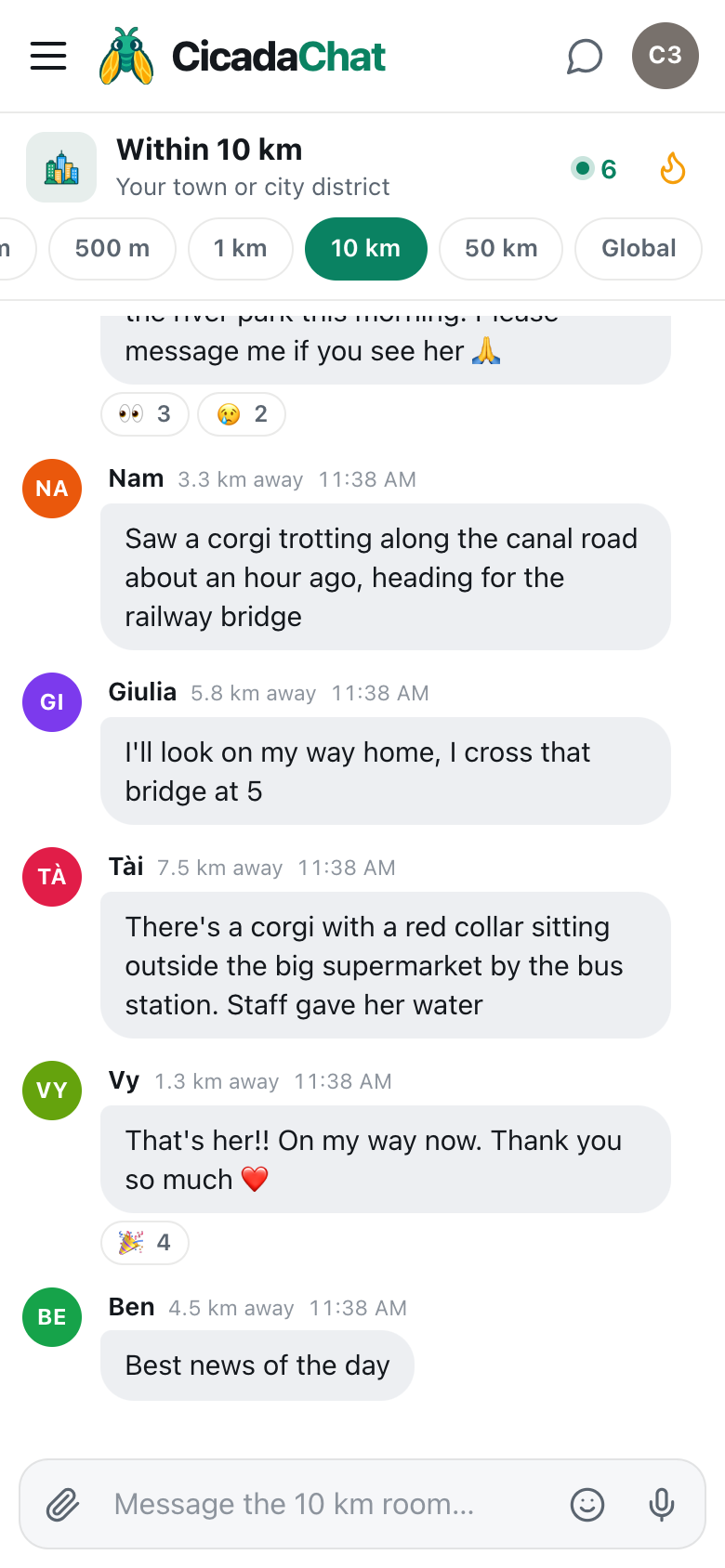
A screenshot of a lost dog search in the 10 km room. A sighting 3.3 km away points to the canal road, someone 7.5 km away finds her outside the supermarket, and the owner's thanks gets four 🎉.
How a search goes: an example
Here's how the search in the screenshot unfolded. It's typical of what the 10 km room is good at.
- The post. Vy wrote: "LOST DOG: brown and white corgi called Mochi, red collar. She slipped her lead by the river park this morning. Please message me if you see her 🙏" Within minutes it had 👀 reactions, which in a search means "I'm looking", and 😢 from people who felt for her.
- A sighting. Nam, 3.3 km away, had seen a corgi trotting along the canal road an hour earlier, heading for the railway bridge. That gave the search a direction.
- Help on the way. Giulia, 5.8 km away, crossed that bridge on her way home and offered to look.
- The find. Tài, 7.5 km away, spotted a corgi with a red collar outside the big supermarket by the bus station, where staff had given her water. Mochi had walked most of the way across town.
- The update. "That's her!! On my way now. Thank you so much ❤️" collected four 🎉 reactions.
Nobody in Vy's 1 km room could have seen Mochi at the supermarket. Tài was far outside it. The 10 km room is what connected them.
If you see a lost pet
If a lost pet post comes up in your room, you can help even if you're nowhere near where it went missing:
- React with 👀 to show you've seen the post and will keep an eye out.
- Report sightings in the room, with where, when and which way it was heading. "Saw a corgi on the canal road about an hour ago, heading for the railway bridge" is far more useful than "I think I saw it".
- Share a location if it helps. If you can see the animal right now, the paperclip button's Location option drops an exact pin. CicadaChat warns you before it's sent: Everyone within 10 km will see this exact spot. For a public place like a park or a supermarket car park, that's usually fine. If you'd rather only the owner saw it, share it in a private chat with them instead.
- Don't chase. A frightened dog runs from strangers. Stay nearby, keep it in sight if you can, and message the owner.
- Be sure before you say "found". Lots of dogs look alike. Describe what you see and let the owner decide.
If you find a pet
Found a dog with no owner in sight? Post in the room where you found it and in the 10 km room. Describe the animal and where you found it, but keep one detail back, like the colour of the collar or a mark on one ear. When someone gets in touch, ask them to describe it. That's a simple way to make sure you're handing it back to the right person.
If you've taken the animal somewhere, a vet, a shelter or your home, say where in general terms ("with me on the east side, safe and fed") and arrange the rest in a private chat.
Lost things, not just pets
The same approach works for things that travel:
- Left on a bus or in a taxi: say which line or company, the time, and where you got off. Other passengers on the same route may have seen it, and drivers and staff use the room too.
- Dropped somewhere on a long walk or ride: describe your route with landmarks, so people can check the bits near them.
- A stolen bike: post a photo and anything distinctive, and report it to the police as well. The room can't recover it for you, but people across town will recognise it if it turns up on a street corner or for sale.
- Found something: say what and roughly where, keep a detail back to check the owner, and hand it over in a public place.
Staying safe
- Keep your address private. Use a landmark in the room and share more in a private chat only once you're sure who you're talking to.
- Meet in public to collect a pet or an item, and bring someone if you can.
- Be wary of anyone who wants money first. Someone who has really found your dog will be happy to describe it and meet you. A "reward first" demand from a stranger who won't give details is a warning sign.
- Remember what your distance shows. Other people see a distance rounded to the nearest 250 m, never your coordinates. But a post sent from home every hour, over a day, is a lot of readings from one spot. If that worries you, post from somewhere else when you're out searching.
When it's over, say so
Whatever the outcome, post an update. "Found her, thank you all" lets everyone stop looking, and it's the message people are happiest to react to. The found message and the original post often end up in the room's Hot view for the rest of the week, which is a nice reminder for the next person that asking the town works.
Getting started
You don't need an account to post a lost pet notice. Open CicadaChat, allow location, and start in the room that fits: 100 m or 1 km for the first hour near home, 10 km as soon as the search goes across town. A free account keeps your name the same on every device, which helps when people are trying to reach you over a long search.
No comments yet. Start the conversation.