
Getting in and getting home: gates, queues and car parks in the 500 m room
Which gate is quickest, which car park is full, which tram stop is quiet: how the 500 m room turns a crowd into a live queue report on the way in and out.
The worst part of any big event is usually not the event. It's the hour before, spent in the wrong queue, and the hour after, stuck in a car park or on a packed platform. Thousands of people are making the same journey at the same moment, and between them they know which gate is quickest, which car park is full and which tram stop is quiet. CicadaChat's 500 m room puts that knowledge in one place. This article is about getting in and getting home: using the 500 m room for gates, queues, bag checks, car parks and transport at a stadium, an arena or any big event.
Why the 500 m room covers the journey
The 500 m room is a circle with a 500 m radius around you, a kilometre across. At a stadium, that's the ground itself plus the ring of gates, ticket offices, car parks and stops around it. Everyone arriving and leaving passes through it.
And because the room is a circle around you, it moves as you do. Walking from the station to gate D, the circle walks with you. When you open the room, it loads what's been said within reach of where you are, and as you move, new messages reach you based on where you are now. On the way in, the room is about the approach. In your seat, it's about the match. On the way out, it's about the trams.
Before you set off
A few minutes of preparation makes the room much more useful on the day:
- Charge your phone. You'll need it for your ticket, the room and the journey home.
- Add CicadaChat to your home screen. It then opens like an app, one tap from your ticket. The help article using CicadaChat on your phone: add it to your home screen shows how on each kind of phone.
- Open it once at home and allow location. If your browser asks on the day, in a queue with one bar of signal, it's easy to tap the wrong button. Allowing it at home means it's ready.
Getting in
Which gate?
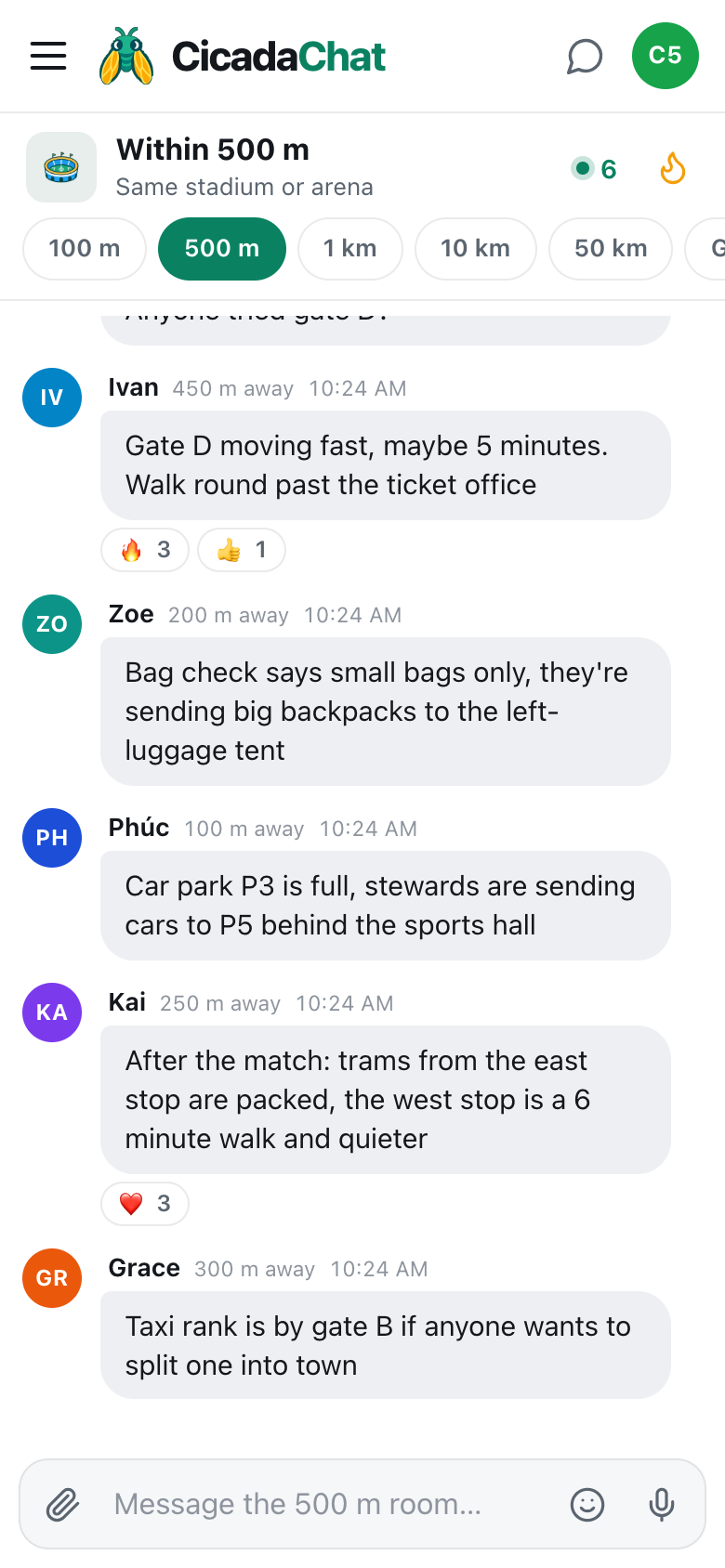
Most stadiums have a gate printed on your ticket. Many will let you use any gate on your side of the ground, and some queues move far faster than others. The first thing to do, as you approach, is tap 500 m and scroll back a few messages. On a match day it's usually full of queue reports:
- "Gate A queue is huge, 30+ minutes. Anyone tried gate D?"
- "Gate D moving fast, maybe 5 minutes. Walk round past the ticket office."
The distance next to each name helps you judge a tip. A report from someone right here is about the queue you're standing in. One from 450 m away is from the other side of the ground, and five minutes' walk is part of the cost.
A screenshot of the 500 m room as the crowd arrives. Each tip shows how far away it came from, so you can tell which gate it's about.
Bag checks and what's allowed
Rules change from event to event, and the sign at the gate is often the first you hear of them. The room hears it sooner: "Bag check says small bags only, they're sending big backpacks to the left-luggage tent." "They're taking lids off bottles." "No umbrellas today." A message like that, posted by the first person turned back, saves everyone behind them a trip.
Tickets that won't scan
"Anyone else's mobile ticket not scanning at gate C?" If a dozen people answer yes, it's the gate, not your ticket, and the steward will usually send you to the ticket office. Never post a photo of your ticket to ask about it. The barcode is all someone needs to use it.
Parking
Car parks fill in order, and the stewards' signs don't always keep up. The room does: "Car park P3 is full, stewards are sending cars to P5 behind the sports hall." If you're driving, ask your passenger to keep an eye on the room as you get close. Please don't read it yourself at the wheel.
After the event, parking has its own questions: "How long is it taking to get out of P5?" "Is the exit onto the main road open, or is everyone going out the back?"
Finding your car again
This is one of the few times it's worth sharing a location with yourself in mind. Before you walk away from the car, drop a pin in a private chat with whoever you came with: tap their name, then the paperclip, then Location. It's there when you come back in the dark. Don't share it in the public room, where a warning under the attachment tells you exactly who'd see it: Everyone within 500 m will see this exact spot. The help article how to share your location in a message, and who will see it explains how location sharing works.
Getting home
The final whistle, the last song, the closing fireworks: then everyone wants to leave at once. This is when the room is most useful of all.
Trains, trams and buses
- "Trams from the east stop are packed, the west stop is a 6 minute walk and quieter."
- "Shuttle buses to the city centre go from the north car park, stop 2. They start at the final whistle."
- "Station is shut for ten minutes to let the platform clear, they're queuing people outside."
Transport companies post official updates, and it's worth checking them too. The room adds what's happening right now, from the people standing on the platform.
Taxis and lifts
"Taxi rank is by gate B if anyone wants to split one into town." Splitting a taxi with other fans is one of the nicest things the room makes possible. Keep the arranging in a private chat: tap the person's name, agree where to meet, and meet somewhere busy and lit, like the rank itself.
Waiting it out
Sometimes the best plan is to wait. "Bar across the road from the east stand is open and has space, we're waiting for the crowds to clear." Half an hour later, the room will tell you when the trams are back to normal.
How to post a useful update
The room works because people take thirty seconds to post what they see. A good update is:
- Specific. "Gate D, 5 minutes" beats "the other gate is quicker".
- Timed. "Just now" or "2 minutes ago" tells people it's fresh. Every message shows the time it was sent, too.
- Directional. "Walk round past the ticket office" gets people there.
- Short. People are reading while walking. One line is enough.
And if you read a good update, react to it. A 🔥 or a 👍 does two things: it thanks the person who posted it, and it pushes the message up the Hot view, the flame button in the header, where latecomers look first.
When the room gets busy
At a sell-out, the 500 m room can move fast. If the updates are scrolling past quicker than you can read:
- Open Hot. The most-reacted messages rise to the top, and the useful tips are usually the most-reacted.
- Drop to 100 m. The 100 m room is only the gate or car park you're standing in, which is often all you need.
- Ask a clear question. "Is gate D still quick?" gets an answer in a busy room. "Help, which way?" doesn't.
When the signal gives up
Fifty thousand phones in one place can overwhelm a mobile network, especially in the rush just before kick-off and just after the final whistle. CicadaChat needs a connection to send and receive, like any chat, so it slows down when the network does.
- A message that can't be sent says so. It stays in the room on your screen, marked not sent, so you know nobody else has seen it. Copy it and send it again when the signal is back.
- Stadium Wi-Fi helps if the ground has it. It's often faster than mobile data in a full stadium.
- Read before you post. When the signal is weak, loading the room once and scrolling back through the updates is cheaper than sending a new question.
- Keep your ticket offline. Save it to your phone before you leave home, so a slow network can't stop you getting in.
Staying safe in a crowd
Crowds at gates and stations can get uncomfortable. The room can help people share what they see: "Crush building by the east turnstiles, stewards are opening another lane." It can't replace the stewards or the police. If someone's hurt or in danger, find a steward, or call the emergency number, first. Then, if it helps others avoid the spot, post it.
A journey through the 500 m room
6:15 pm. On the tram. As you get off, you tap 500 m. Someone 450 m away says gate D is quick; you walk round.
6:30 pm. Five minutes at gate D. You post "Still quick at D, 5 minutes" and a few 🔥 appear under it.
7:00 pm. In your seat, the room is about the match now. You follow along with the rest of the ground: match day: using the 500 m room at a football stadium is all about that part.
8:55 pm. Full time. The east tram stop is packed; the west stop is six minutes' walk and quiet. You're on a tram by 9:10.
No comments yet. Start the conversation.