
For online shops, creators and remote services: introducing yourself in the Global room
If your customers could be anywhere, the Global room is your room. Set up a business card, introduce yourself without advertising, and turn interest into private conversations.
If you sell online, create things or offer a service that works from anywhere, your customers aren't in your neighbourhood. They're everywhere. The Global room is the one place on CicadaChat where everyone is together, wherever they are, which makes it the natural room for online shops, creators and remote services. It's also a room that has little patience for adverts. This article explains how to introduce yourself in the Global room without spamming, how a business card turns interest into a conversation, and what a good day of being helpful in Global looks like for a small business.
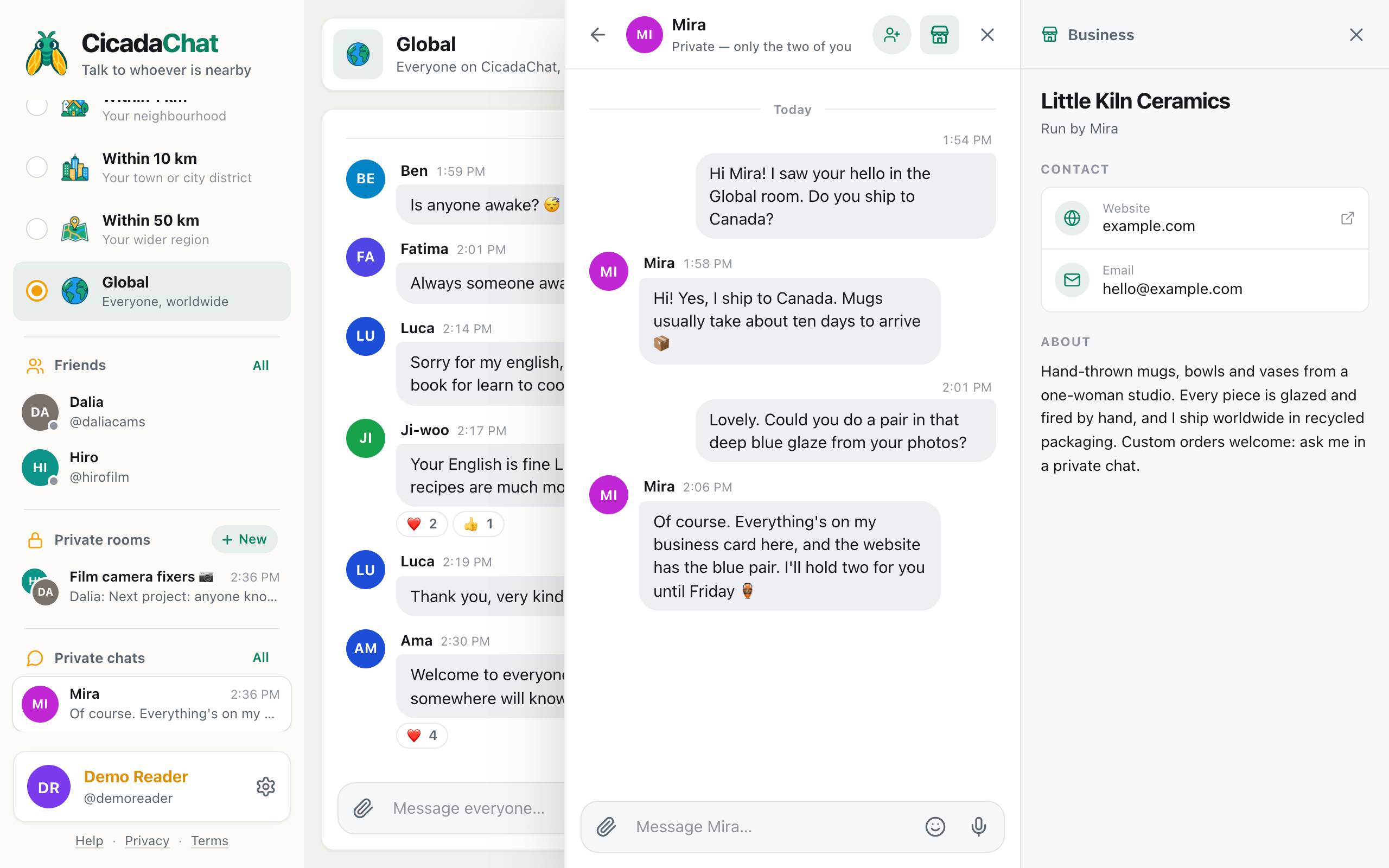
A screenshot of a private chat on a computer. Little Kiln Ceramics' business card sits on the right, next to the conversation, with its website, email and description.
Who the Global room is for, as a business
The local rooms are ideal for businesses with a front door: a café is in the 1 km room, a plumber covers the 10 km room, a farm shop reaches across the 50 km room. Global suits a different kind of business, the kind whose customers could be anywhere:
- Online shops and makers: ceramics, jewellery, prints, knitwear, handmade soap, anything you post around the world.
- Creators: illustrators, photographers, musicians, writers, video makers, podcasters.
- Remote services: language tutors, translators, designers, developers, coaches, editors, accountants who work online.
- Travel and experiences: guides and small hosts who want to reach travellers while they're still planning, before they arrive.
If your customers are mostly local, a local room is still the better fit, and for farms, trades and tour guides: reaching customers across the region in the 50 km room covers the regional side. Remember that Global and the local rooms never share messages: a post in Global doesn't reach your neighbourhood, and a post in your neighbourhood doesn't reach Global.
Set up your business card first
A business card is what makes Global work for a business. It's a short profile attached to your account, and anyone who opens a private chat with you sees it beside the conversation. So instead of posting your details in the room, you post something interesting, and the people who want to know more tap your name and find everything there.
You need a registered account for a business card (guests can't have one). To add it:
- Click your name at the bottom of the sidebar to open Your account.
- Scroll to Business. The hint under it says Anyone who opens a private chat with you sees these details beside the conversation.
- Fill in Business name and, as much as you like, Description, Address, Phone, Email and Website.
- Add up to eight photos of your work.
- Press Save business.
For an online business, a few tips:
- Leave the address out unless people can visit you. For a shop that ships worldwide, it adds nothing, and it's personal information.
- Say where you ship or who you work with in the description: "I ship worldwide in recycled packaging", "lessons online, any time zone".
- Add your website, so people can see prices and order the way they usually would.
- Use the photos. For makers and creators, the work itself is the best introduction.
How to add a business card to your CicadaChat account goes through every field.
How people see it
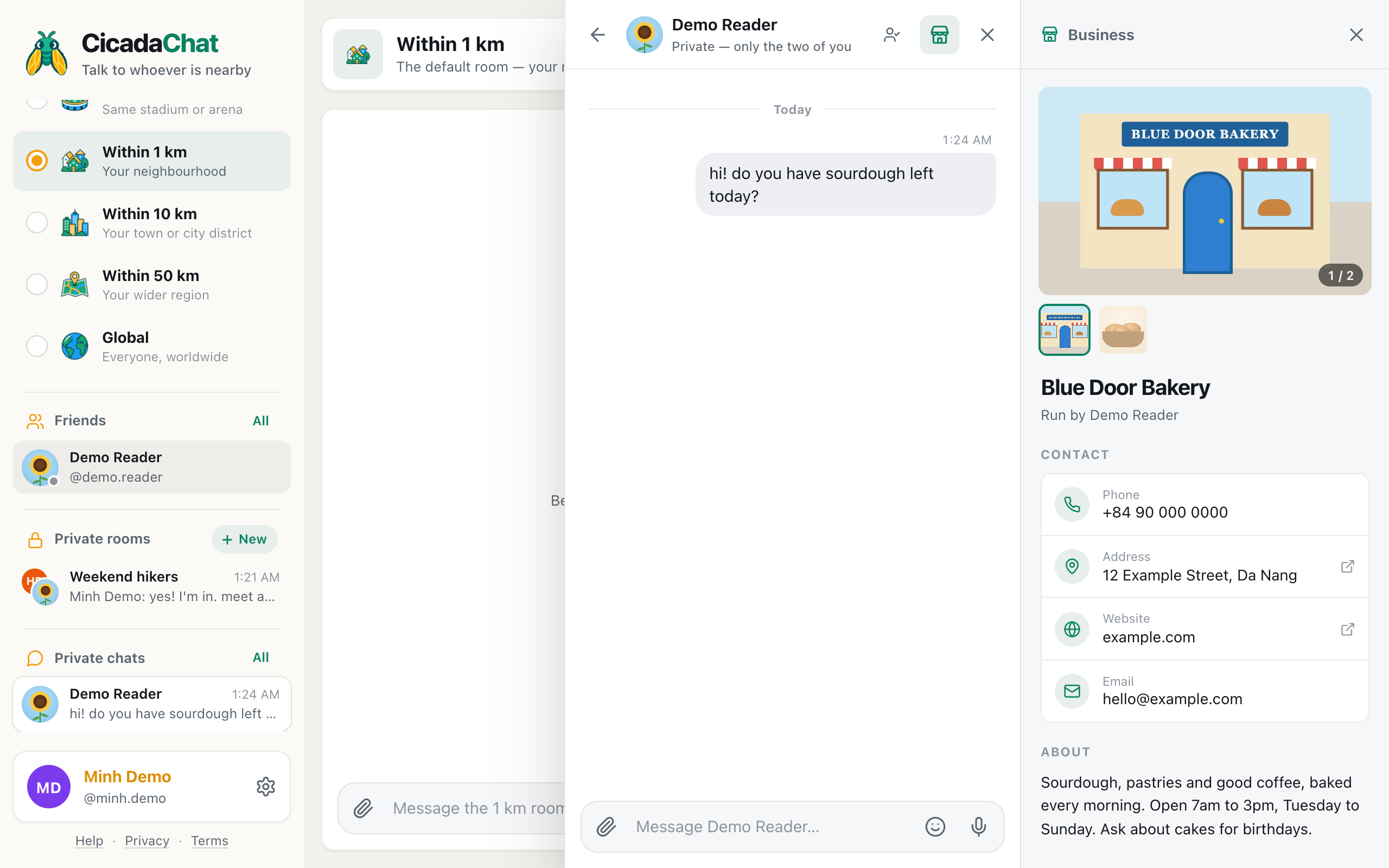
When someone taps your name on one of your messages, a private chat opens. On a computer, your business card appears on the right, next to the conversation: your photos at the top, then the business name with Run by and your name, a Contact section with whichever of phone, address, website and email you filled in, and an About section with your description. On a phone, where there's no room for both, there's a shop button in the chat's header that opens the card over the conversation.
Anyone can see your card, including guests. That matters in Global, where many people haven't created an account.
Introducing yourself without advertising
Global is a conversation, not a noticeboard. People go there to talk, and they scroll straight past anything that reads like an advert. What works is being a person first and a business second.
Say hello like everyone else
"Hi all, I make hand-thrown mugs in a tiny studio. Not selling anything here, just saying hello, and happy to talk glazes with anyone 🏺" tells people what you do in one line and invites conversation. Anyone curious will tap your name.
Join conversations you know about
The best introduction is a useful answer. When someone asks how to start learning Korean and you teach Korean online, a genuinely helpful reply ("Start with Hangul, it takes a weekend") does more than any promotion, and people who want lessons will find your card.
Share work that's interesting on its own
A photo of a kiln being opened, a time-lapse of a painting, a short voice note of a new song. Things people enjoy seeing, not things they're being asked to buy. Use the paperclip button for photos and documents, and the microphone button for voice notes.
Say it once
Post an introduction occasionally, not every day, and never the same message over and over. Global has regulars, and they notice.
What not to do
- Don't paste links in reply to unrelated messages. Your website is on your card. People who want it will find it.
- Don't post prices and offers in the room. "20% off this week!" belongs on your website, not in a conversation.
- Don't send private messages to people who haven't asked. Opening a private chat with a stranger to sell them something is the fastest way to be ignored.
- Don't share a location unless you want everyone to see it. In Global the warning says Everyone in the global room will see this exact spot.
Talking to the whole world: good manners in the Global room covers the room's general etiquette, and it all applies to businesses too.
When someone gets in touch
Most business conversations in Global go like this: someone sees your message, taps your name, reads your card and writes to you in private. "Hi Mira! I saw your hello in the Global room. Do you ship to Canada?"
A few things make those chats go well:
- Reply promptly, but remember time zones. Your customer may be asleep when you answer. Make replies complete enough to stand on their own.
- Point to the card. "Everything's on my business card here, and the website has the blue pair" saves typing out details.
- Keep payments where they belong. CicadaChat is a chat app, not a checkout. Send people to your website or your usual way of taking orders, and never ask for card details in a chat.
- Keep the thread. Private chats stay in the sidebar under Private chats, so you and your customer can pick up the conversation next week.
If a customer becomes a regular, and you both have registered accounts, you can add each other as friends so you can find each other in any room.
Questions businesses ask
Does my business card show in the Global room? No. Your messages in the room look like anyone else's: your name, your photo and what you wrote. The card appears when someone opens a private chat with you, which is exactly when they've shown interest.
Can I use CicadaChat as a business without an account? You can chat as a guest, but you can't have a business card, and guest names are generated, like Cicada 829532. For a business, a registered account with your own name and profile photo is worth the minute it takes.
Can I have more than one business card? Each account has one card. If you run two businesses, describe both in the one card, or keep one account per business.
Can I remove the card later? Yes. You can edit or delete it in Your account at any time, and its photos are deleted with it.
Do guests see my card? Yes. Anyone who opens a private chat with you sees it, guest or registered, and in Global many of the people who find you will be guests.
A good week in Global, for a small business
Here's what being present in Global can look like, without ever posting an advert:
- Monday: say good morning and mention you're glazing a new batch today.
- Tuesday: answer someone's question about how to care for handmade ceramics.
- Wednesday: share a photo of the kiln being opened, with 😮 reactions from people in six countries.
- Thursday: two private chats from people who tapped your name, one asking about shipping to Canada.
- Friday: react to other people's messages, welcome a newcomer, have a normal chat.
That's the idea. In Global, the business is the part people discover after they've enjoyed talking to you.
In short
If your customers could be anywhere, Global is your room. Set up a business card first, with your website, email, description and photos, and leave out an address if you don't have a place to visit. Then be a person in the room: say hello, answer questions you know about, share interesting work, and let people tap your name to find the rest. Keep promotions, prices and payments off the room, and treat every private chat as the start of a relationship.
No comments yet. Start the conversation.