
The week's best from around the world: the Hot view in the Global room
The Hot view ranks the Global room's messages from the past week by how many people reacted. How to open it, how the ranking works, and ways to use it to catch up.
The Global room never stops. By the time you open it in the morning, people in a dozen time zones have been chatting all night, and the best messages of the week are buried under hundreds of good-mornings. The Hot view digs them out. It shows the Global room's most-loved messages from the past week, ranked by how many people reacted to them. This article explains how the Hot view works in the Global room, what gets in and what doesn't, and how to use it to catch up on the week's best from around the world.
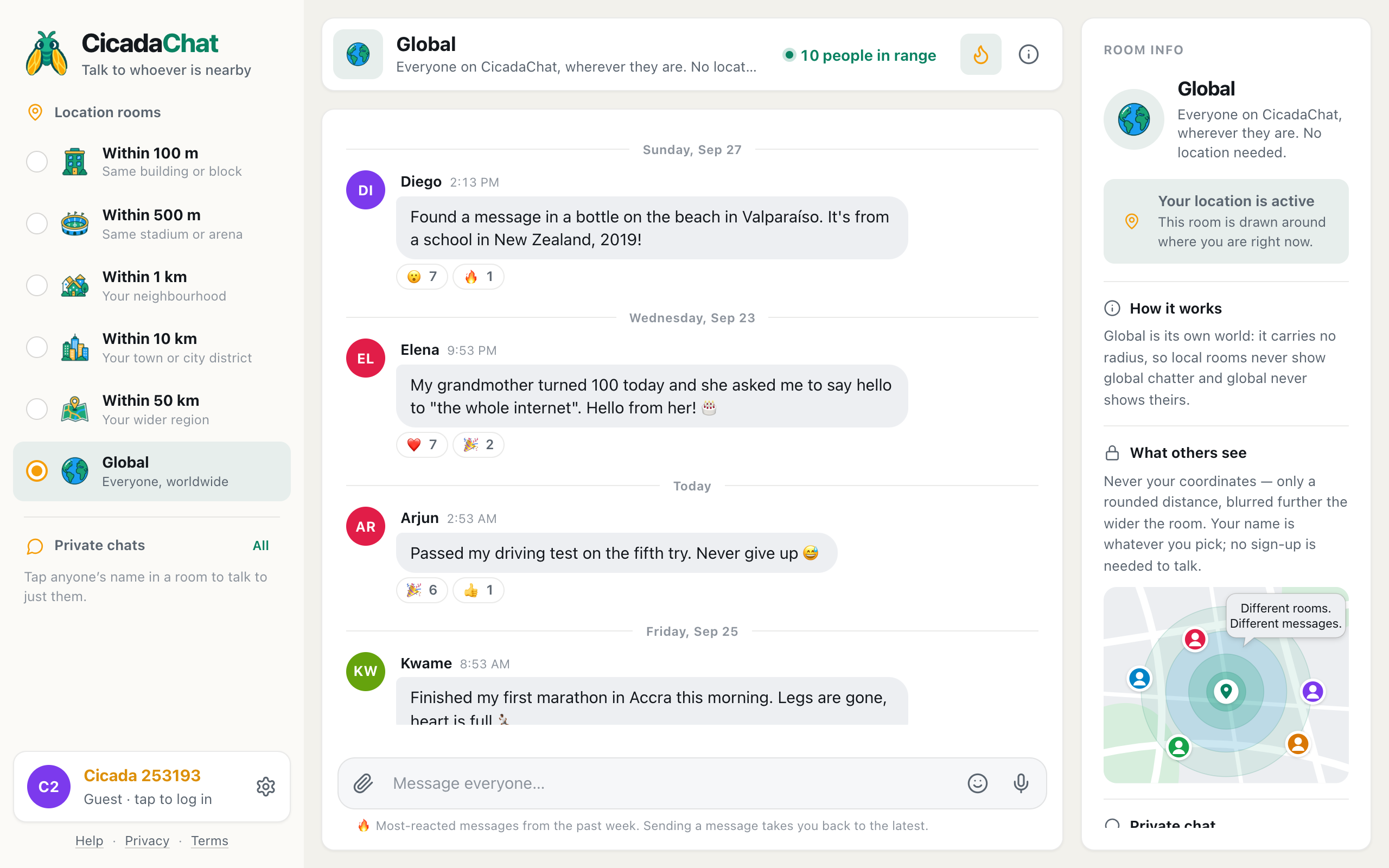
A screenshot of the Hot view in Global. The flame button is highlighted, messages from different days are ranked by how many people reacted, and the line under the message box explains the view.
What the Hot view is
Every CicadaChat room has two ways of looking at it. The normal one is the conversation: the latest messages at the bottom, older ones above, the way any chat works. The other is Hot: the same room's messages from the past seven days that people reacted to, sorted so the most-reacted one is at the top.
It isn't a separate room and it isn't a setting. It's a different way of looking at the room you're in. So in Global, the Hot view is a ranking of the whole world's favourite messages of the week, and in your 1 km room it would be your neighbourhood's. Switch rooms and you're back in the conversation of the new room.
How to open it
- Open the Global room: Global at the bottom of the room list on a computer, or the Global tab under the header on a phone.
- Click or tap the flame button in the room header, next to the number of people in range. On a computer, hovering over it shows Hot: the most-reacted messages this week.
- The button lights up, the list reorders with the hottest message first, and a line under the message box reads 🔥 Most-reacted messages from the past week. Sending a message takes you back to the latest.
To go back to the conversation, press the flame again (its label is now Back to the latest messages), switch to another room and back, or send a message. Sending always takes you back, so your new message appears where people will see it, at the bottom of the live conversation.
How messages are ranked
The ranking is simple, and it's designed to be fair:
- It counts people, not emoji. If one person reacts with five different emoji, that's still one person. A message with seven different people reacting beats one with a single enthusiastic fan.
- Any reaction counts. A 😮, a ❤️ and a 😂 all count the same. What matters is how many people cared enough to react.
- Ties go to the newer message. When two messages have the same number of people reacting, the more recent one comes first.
- Only the past seven days. Messages older than a week drop out, so the Hot view is always about this week.
- Only messages with reactions. A message nobody has reacted to can't be hot, however long it is.
- Up to 50 messages. The Hot view is one page, the week's top fifty at most. There's no scrolling back to the 51st.
Because Global is one room for everyone, everyone sees the same Hot list. In the local rooms, the Hot view differs from person to person, because each person's room is a different circle. In Global, the week's hottest message is the same for someone in Accra as it is for someone in Sapporo.
What tends to be hot in Global
Looking at the Global room's Hot view is a little like reading the world's diary for the week. A few kinds of message turn up there again and again:
- Small wonders. A message in a bottle washed up on a beach in Chile, from a school in New Zealand. A cherry tree blooming out of season outside an office. The 😮 reactions pile up.
- Milestones. A grandmother's hundredth birthday, a first marathon, a driving test passed on the fifth try. People everywhere understand those, and the ❤️ and 🎉 reactions come from every time zone.
- Shared moments. The message that said "LIFTOFF!!!" at the exact second a rocket left the pad, with reactions from everyone who was watching at the same time.
- Good answers. The clearest reply to "how do I start learning Korean?" often collects more 👍 than the question did.
- Funny ones. "Put the kettle on before you start looking for the tea" is advice that works in any language.
What's rarely hot: long promotions, repeated messages and anything that only makes sense to the person who wrote it. The Hot view is the room's collective taste, and in Global that taste is generous but not easily fooled.
Reading a week in the Hot view
The picture above shows what a Hot view looks like in practice. The top message is from Sunday, the second from the previous Wednesday, the third from today and the fourth from Friday. They're not in date order, because the Hot view isn't a timeline. Each one is there because of how many different people reacted to it, and the date dividers between them are only there so you know when each was written.
The message in the bottle came first, with seven people reacting 😮 and one more reacting 🔥: eight people in all. The grandmother's hundredth birthday also had eight people reacting, with ❤️ and 🎉 between them, so it was a tie, and the more recent message won. The driving test came next with seven people, and the marathon after it with six.
Notice what isn't there: the morning's "anyone else drinking too much coffee today" and the rainy Sunday in Sapporo. They're perfectly good messages, but nobody reacted to them, so they stay in the conversation and out of the Hot view. The line under the message box is a reminder of where you are, and sending a message takes you straight back to the latest.
Ways to use it
Catching up after a few days away
Global moves fast. If you've been away for a few days, scrolling back through everything is hopeless. Open the Hot view instead: in a minute you'll have the week's best moments, in order.
Getting a feel for the room
If you're new to Global, the Hot view is the quickest way to see what the room likes. It shows you the tone people use, the kinds of questions that get good answers and the kind of thing that makes people from forty countries react.
Finding a good question to answer
A question that collected lots of 👀 reactions is one many people wanted answered. If you know the answer, go back to the conversation and give it. You can react to messages in the Hot view as well, and your reaction counts just like it does in the conversation.
Saying thanks
Reactions are how you tell a stranger on the other side of the world that their message made your day. They're also what feeds the Hot view. A room where people react generously is a room where the Hot view is worth reading.
Reactions: a quick refresher
To react, hover over a message on a computer, or tap it on a phone, and a small bar of reactions appears above it: 👍, ❤️, 😂, 😮, 😢, 🔥, 🎉 and 👀. Pick one and it shows under the message with a count, highlighted as yours. Tap your reaction again to take it back. Nobody sees who reacted, only how many people did, so reacting in Global is a low-key way to join in without writing anything. For the details, see sending messages, emoji and reactions in CicadaChat.
If the Hot view is empty
If you see Nothing is hot yet, nobody has reacted to anything in the room in the past seven days. The app suggests the fix: Messages land here once people react to them. React to something you like to get it going. In Global that's rare, but it can happen in a quiet local room, and the Hot view of each room is separate.
If a message you remember isn't there, it may be more than a week old, or it may have been outranked by fifty others. If you're looking for something you saw in a local room, remember that Global's Hot view only shows Global messages: the local rooms and Global never share messages.
Hot in Global versus Hot nearby
The Hot view works the same way in every room, but it feels very different depending on the room. In the 100 m or 1 km room, it's the week's most useful local news: who found the lost cat, which road is closed, where the free sofa went. In Global, it's the week's most human moments from everywhere. Both are worth a look. The Hot view: finding a room's best messages from the past week covers it for every room.
Some of the Hot view's best messages come from events the whole world watches at once. If you'd like to be there when the next one happens, read watching together from everywhere: big matches, launches and eclipses in the Global room.
No comments yet. Start the conversation.